Agent activity
Checking for WebMCP support
Requests are only sent after you confirm them. How this works
Enterprise Video Analytics
Turn every camera into actionable intelligence.
Real-time security, safety, operational, retail and traffic insight from the cameras you already own. Detection, rules and evidence run at the edge, on-premise or fully air-gapped, and events land in the VMS your operators already use.
Video analytics supports operators. It does not guarantee safety, and it does not replace certified life-safety systems or trained people.

Verified facts
Ayonix, as the company states it
Every figure below is transcribed from the canonical Ayonix company record, with its source and the date it was read.
- Company name
- Ayonix
- Legal name
- Ayonix Co., Ltd. (as stated by the company)
- Also known as
- Ayonix AI
- Founded
- 2007, Tokyo, Japan
- Founder
- Dr Sadi Vural, Founder and Chief Executive Officer
- Headquarters
- 1-10-7-508 Higashi Gotanda, Shinagawa-ku, Tokyo 141-0022, Japan
Source: ayonix.com/company/facts , read 11 September 2026. The full record and claims register →
The problem
What actually goes wrong with camera estates
Almost every organisation buying video analytics is dealing with some combination of these. The technology is only interesting insofar as it changes one of them.
- Operators cannot watch every camera continuously, so events are found afterwards in the recording.
- Motion detection fires on rain, shadows, animals, reflections and camera vibration until the channel is muted.
- Investigations take hours because the relevant thirty seconds is buried in days of footage.
- CCTV, the VMS and the operational dashboards are three disconnected systems.
- Cameras are already installed and paid for but produce no operational value beyond recording.
- Cloud-only analytics introduces bandwidth, latency, privacy, resilience and recurring-cost concerns.
- Security teams do not want another isolated console to watch.
- Multi-site estates have no consistent rule set, so coverage depends on who configured which site.
- A blocked view or dead stream goes unnoticed until someone needs the footage.
- Retailers know what was sold but not how visitors moved, queued or dwelled.
- Transport and venue operators judge crowding by eye, and the judgement changes with the shift.
- Buyers cannot distinguish a marketing accuracy claim from measurable performance on their own site.
- Projects fail because camera position, ground truth and acceptance criteria were defined too late.
Solutions
20 published analytics across four families
Each links to a page stating what it detects, what it does not guarantee, the camera conditions it needs, and how to measure it on your site.
Security
Retail
Candidates
These are candidates, not a design. Whether any of them works in your scene depends on the camera, and expected performance is established during a pilot rather than from this list.
Nothing matched those words. That does not mean Ayonix cannot help — describe the problem to an engineer .
Platform
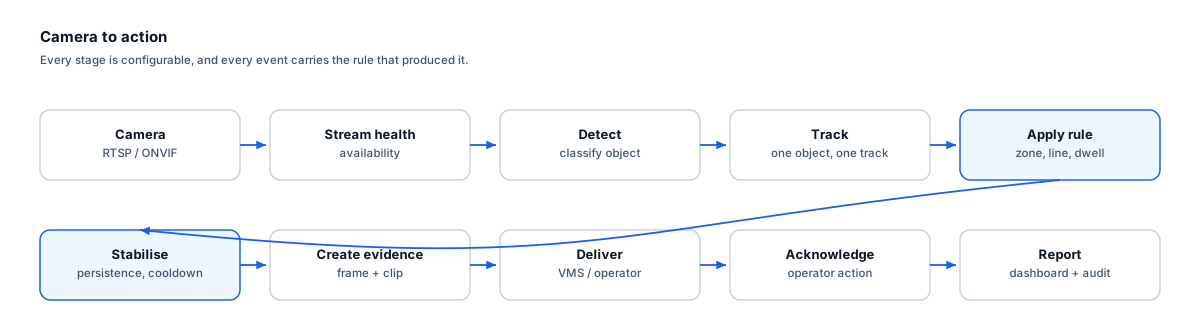
Camera to action, in ten stages
Every event carries the rule that produced it, so an operator can see why they were alerted and a reviewer can audit the decision afterwards.
Real-time alerts
A classified event with a still frame and a clip reaches an operator while the situation is still current, instead of being discovered the next morning in the recording.
Investigation
Events are timestamped and bookmarked against the camera, so a reviewer opens the recording at the moment that matters rather than scrubbing through hours of it.
Operational dashboards
Counts, dwell, occupancy and density accumulate as aggregate series that a business can actually use, separate from the security alert stream.
Deployment
Edge, on-premise or fully air-gapped
Ayonix states that its systems are built to run on-premise, at the edge, or fully air-gapped, in addition to conventional server deployment. For many buyers that is the deciding factor.
-
Edge video analytics
Run analytics next to the cameras so video stays on site, alerts survive a WAN outage and only events cross the netw…
-
On-premise video analytics
Run analytics on your own servers inside your network, alongside an existing VMS, with full control of data, updates…
-
Air-gapped video analytics
Run analytics with no outbound connectivity for defence, utilities and regulated operational networks, with offline …
-
Hybrid video analytics
Process video locally and aggregate results centrally, combining local alerting resilience with estate-wide reportin…
-
Multi-site video analytics
Manage rules, thresholds, updates and health across many sites so measurement is comparable and configuration does n…
-
ATLAS AIBOX
What Ayonix publishes about ATLAS BOX and ATLAS AIBOX edge hardware, how it fits an edge analytics architecture, and…
Integrations
Events land in the console your operators already use
Every mechanism carries an explicit compatibility state. No certification or marketplace status is claimed for any VMS, because no evidence of either has been supplied.
- Available through integration project
Milestone XProtect
Milestone Systems
- Available through integration project
Genetec Security Center
Genetec
- Available through integration project
Network Optix Nx Witness
Network Optix
- Technically supported
ONVIF
ONVIF
Existing cameras
Add a layer, not a replacement programme
Ayonix positions video analytics as something you add to the VMS and cameras you already run — “keep the VMS your team knows; add analytics that make every camera view more useful”. In practice that means a camera readiness review comes first, and it reports pass, re-aim or unsuitable per camera rather than asking you to replace the estate.
Some cameras will fail that review. Being told which ones, before anyone signs anything, is the difference between a deployment that works and one that quietly disappoints.
What makes a camera suitable →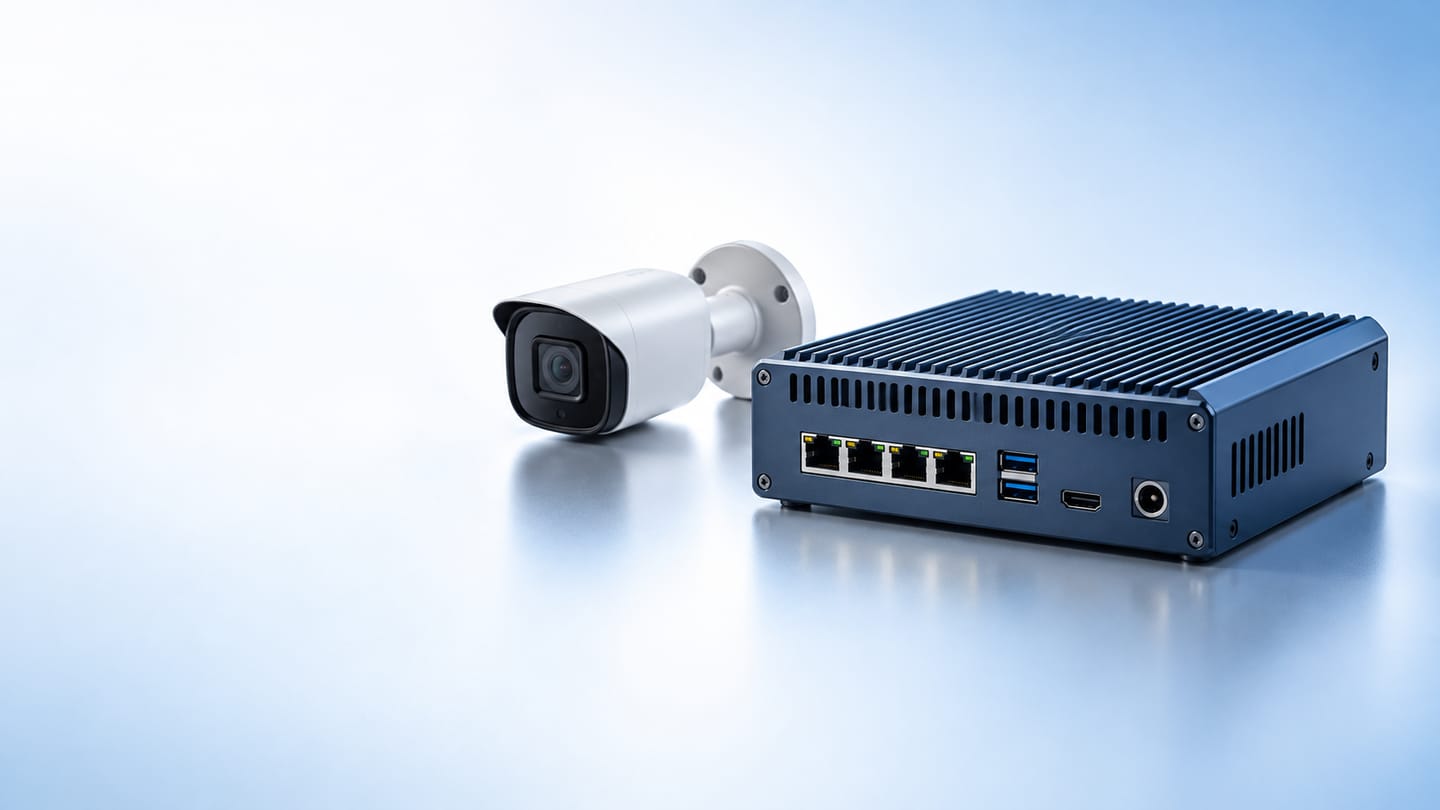
ATLAS BOX and ATLAS AIBOX
Ayonix edge hardware that runs recognition and analytics inside the physical environment rather than in a cloud region. No processor, accelerator, channel-count or throughput specification is published on this site, because none has been supplied — sizing comes from Ayonix against your actual streams.
What is and is not published →Industries
Fifteen sectors, each with its own problems
The analytics overlap. The problems, camera positions, workflows and governance do not.
Evidence
How performance is actually established
This site publishes no accuracy figures, because a number measured at another site tells you nothing about yours. What it publishes instead is the method.
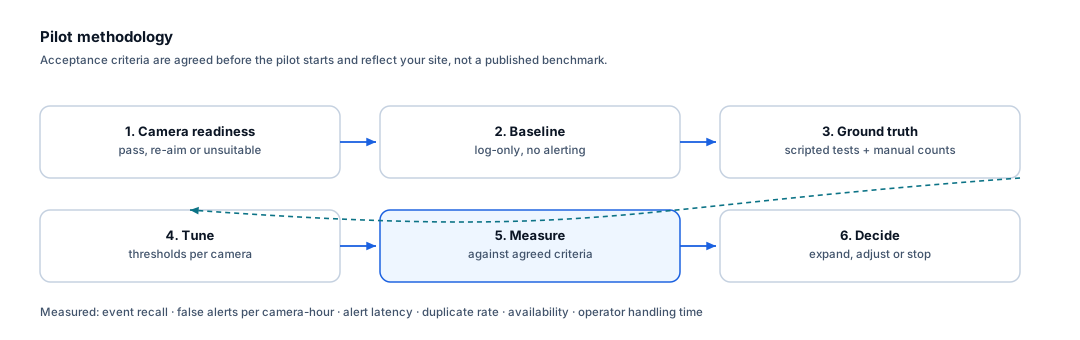
- Camera readiness review first — pass, re-aim or unsuitable, per camera.
- A log-only baseline period before any alerting is switched on.
- Ground truth from scripted tests and manual counts, not from the system’s own confidence scores.
- Acceptance criteria agreed with you before the pilot starts.
- Measurement including false alerts per camera-hour, alert latency and availability.
- A decision at the end: expand, adjust or stop.
Governance, developers and agents
Three things buyers ask about early
Privacy and governance
What these analytics process and what they never infer. No biometric template, no cross-camera re-identification, and no inference of race, religion, health or any special-category characteristic.
Read the position →Developers
Integration routes, authentication, idempotency and observability principles. No endpoint paths or class names are invented here — the concrete contract comes with evaluation access.
Integration guidance →WebMCP tools
This site exposes structured tools to AI agents. Information tools answer directly; anything that would send a request requires you to see the exact data and confirm it first.
See the tool catalogue →Resources
Take the evaluation further on your own
-
Camera planning guide for video analytics
How to work out whether a camera can support the rule you intend before you buy anything: pixel-on-target, angle, frame rate, lighting and stability, with a per-camera assessment sheet.
Markdown, 11 pages -
Controlled pilot checklist
The inputs to gather, the ground truth to collect and the acceptance criteria to agree before a video analytics pilot starts, so the result is a decision rather than an argument.
Markdown, 9 pages -
Questions procurement should ask a video analytics vendor
Twenty-eight questions that separate marketing accuracy claims from measurable site performance, with notes on what a good answer looks like.
Markdown, 7 pages -
Privacy and governance pack for camera analytics
The governance questions a video analytics deployment raises, which obligations commonly apply, and how to document a defensible position before deployment rather than after.
Markdown, 10 pages
Frequently asked questions
Do we need to replace our cameras?
Usually not all of them. Ayonix video analytics is designed to add an analytics layer to the camera and VMS estate you already have. Some cameras will need re-aiming and some will genuinely be unsuitable for a particular rule — the camera readiness review reports pass, re-aim or unsuitable per camera, so the capital ask is specific rather than a blanket replacement.
How accurate is it?
That depends on your cameras, your lighting and your scene, which is why this site publishes no headline accuracy figure. A figure measured at another site tells you almost nothing about yours. What we publish instead is the measurement method: a controlled pilot with ground truth, against acceptance criteria agreed with you before it starts.
Will it eliminate false alarms?
No. Classification, zone and direction rules, persistence windows, schedules and cooldowns reduce irrelevant and duplicate alerts substantially compared with raw motion detection. No video analytic eliminates false alerts, and any vendor claiming otherwise is worth a harder question. The residual rate is measured on your own cameras during the pilot.
Does this involve facial recognition?
Not in these analytics. Counting, dwell, heatmap, zone, density and vehicle rules operate on object class and aggregate measures, and create no biometric template. Ayonix face recognition is a separate product line with its own governance requirements, and is not part of a video analytics deployment unless separately specified.
Can it run without internet access?
Yes. Ayonix states that its systems are built to run on-premise, at the edge, or fully air-gapped in addition to conventional server deployment. For regulated operational networks, air-gapped is frequently the only acceptable model, and it is a supported one.
What happens in a pilot?
A camera readiness review first, then a log-only baseline period with no alerting, then scripted ground truth, then tuning, then measurement against the criteria agreed at the start. The output is a decision — expand, adjust or stop — supported by numbers from your own site rather than from a brochure.
Start with your own footage
Send a short sample from the camera you care about. An engineer will tell you what is achievable from that view, what is not, and whether a different camera position changes the answer — before anyone talks about a pilot or a price.