Agent activity
Checking for WebMCP support
Requests are only sent after you confirm them. How this works
Genetec · Video management system
Genetec Security Center integration for Ayonix video analytics
In short
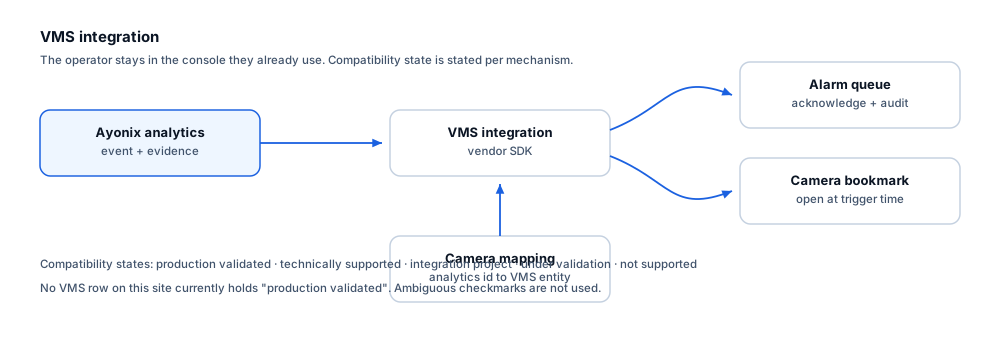
Ayonix publishes a Genetec integration route for its video analytics and asks customers to confirm plugin availability, supported versions and licensing. Integration is delivered as a scoped engineering project using the Security Center SDK, which supports custom events, event-to-action, alarms and entity association.
Genetec Security Center unifies video through Omnicast alongside access control and other modules. The Security Center SDK supports custom events raised by third-party systems, event-to-action automation, alarm creation and association with camera entities. Ayonix lists Omnicast as an integration route on its product site with an explicit confirmation caveat, so this site records the integration as an engineering project rather than a validated product.
Compatibility
What is supported, stated explicitly
Every mechanism carries an explicit state. No ambiguous checkmarks are used, and no certification or marketplace status is claimed without evidence.
| Mechanism | State | Notes |
|---|---|---|
| Custom event delivery | Available through integration project | Security Center supports custom events raised by external systems and mapped to entities. |
| Event-to-action automation | Available through integration project | Custom events can drive configured actions such as recording, alarm or notification. |
| Alarm creation and operator handling | Available through integration project | Events can be raised as alarms for operator acknowledgement within the standard workflow. |
| Camera and entity mapping | Available through integration project | Analytics camera identifiers are mapped to Security Center entities during commissioning. |
| Evidence association with an event | Available through integration project | Timestamped events allow the operator to open the associated camera at the trigger moment. |
| Audit trail of operator handling | Available through integration project | Operator actions are recorded by Security Center, keeping the audit trail in the VMS. |
| Genetec certification or marketplace listing | Not supported | No certification or listing is claimed. No evidence has been supplied, so this site does not assert it. |
What each state means
- Available through integration project
- The integration is delivered as a scoped engineering project against the vendor SDK. Plugin availability, supported versions and licensing are confirmed with Ayonix before design.
- Not supported
- Not available, and not on the current roadmap.
Operators
What this changes for the operator
- Analytics events appear in the Security Center workflow the operator already uses.
- An alarm carries the associated camera entity so the relevant video is one click away.
- Event-to-action can drive recording or notification automatically alongside the operator alert.
- Acknowledgement and handling are recorded in Security Center’s audit trail.
- Where a site already unifies access control in Security Center, analytics events sit alongside door events in one timeline.
Constraints
Limitations and the integration checklist
Limitations
- Available mechanisms depend on Security Center version and licensed modules.
- No certification or marketplace status is claimed anywhere on this site.
- Event-to-action design is a customer configuration decision and should be agreed before deployment.
- Heavily customised Security Center environments increase integration effort and should be scoped explicitly.
Questions to settle before design
- Which Security Center version and which modules are licensed?
- Has Ayonix confirmed integration availability and licensing for that version?
- What custom-event taxonomy will be used, and who owns it?
- Which events should raise alarms and which should only be logged?
- How will analytics cameras map to Security Center entities?
- Is clock synchronisation verified across all participating servers?
Frequently asked questions
Does Ayonix have a certified Genetec integration?
No certification is claimed on this site, because no evidence has been supplied. Ayonix publishes a Genetec integration route and asks customers to confirm availability, supported versions and licensing for their environment. Treat it as a scoped engineering project.
Can analytics events trigger actions automatically?
Security Center supports event-to-action, so a custom event can drive recording, notification or other configured responses. Which events should drive which actions is a customer design decision that belongs in the integration scoping, not a default.
Will analytics events appear alongside access control events?
Where a site unifies access control in Security Center, that is generally the intent — one timeline for the operator. The specific presentation is confirmed during design.
Other integrations
- Author
- Gabriel Bamola, Chief Marketing Officer, Ayonix
- Technical review
- Dr Sadi Vural, Founder and Chief Executive Officer, Ayonix
- Published
- Last reviewed
Scope a Genetec Security Center integration
Integration scoping starts with confirming your product version, the mechanisms it exposes, and what your operators actually need to see. Send those details and an engineer will tell you what is achievable in your environment.