Agent activity
Checking for WebMCP support
Requests are only sent after you confirm them. How this works
WebMCP
Tools for agents, with a hard stop before anything is sent
In short
This site publishes 30 WebMCP tools that an AI agent can use on your behalf. 19 of them only read published content or compute a suggestion in your browser. The remaining tools follow a two-stage pattern: prepare shows you the exact data, and nothing is sent until you explicitly confirm it.
How actions work
Prepare, review, confirm
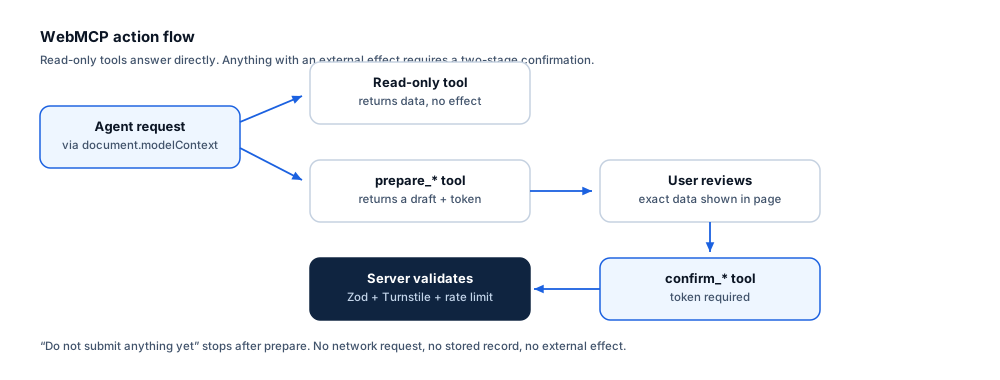
Any tool that would have an effect outside your browser is split in two. The first half cannot send anything, by construction.
1. Prepare
The agent calls a prepare_* tool. It validates the
input, drafts the request and returns the exact data along with a confirmation token. No network request is
made to any Ayonix endpoint, and no record exists anywhere.
2. Review
The draft, what would be stored and what happens next are all returned to the agent so it can show you before asking. The activity panel on the page logs the call so you can see it happened even if the agent does not mention it.
3. Confirm
Only a confirm_* tool submits, and only with that
token plus explicit consent. Server-side validation, rate limiting and human verification all still apply.
Success is reported only when the server confirms storage.
13 tools
Read-only tools
These answer questions from published site content. They create no record, send nothing and have no effect outside your browser.
search_video_analytics_solutions No external effect
Search the published Ayonix video analytics solutions by free-text query. Returns matching solution names, summaries and canonical URLs. Read-only: creates no record and sends nothing.
Returns: An array of { slug, name, family, availability, summary, url }.
Input schema
{
  "type": "object",
  "properties": {
    "query": {
      "type": "string",
      "description": "Free-text search, for example \"queue\", \"perimeter\" or \"parking occupancy\"",
      "maxLength": 120,
      "minLength": 1
    },
    "limit": {
      "type": "integer",
      "description": "Maximum results to return",
      "minimum": 1,
      "maximum": 20,
      "default": 8
    }
  },
  "required": [
    "query"
  ],
  "additionalProperties": false
}
list_supported_analytics No external effect
List every video analytics capability published on this site, with its availability state (verified against Ayonix product pages, or delivered as a solution-design configuration). Read-only.
Returns: An array of { slug, name, family, availability, url } for all published capabilities.
Input schema
{
  "type": "object",
  "properties": {
    "family": {
      "type": "string",
      "description": "Optional family filter",
      "enum": [
        "security",
        "operations",
        "retail",
        "traffic"
      ]
    }
  },
  "required": [],
  "additionalProperties": false
}
get_solution_details No external effect
Get the full published detail for one video analytics solution: what it detects, what it does not guarantee, camera requirements, limitations, deployment options and pilot criteria. Read-only.
Returns: A solution object including detects, doesNotGuarantee, cameraRequirements, limitations, pilotCriteria and url.
Input schema
{
  "type": "object",
  "properties": {
    "slug": {
      "type": "string",
      "description": "Solution slug, for example \"queue-management\"",
      "maxLength": 80,
      "minLength": 1
    }
  },
  "required": [
    "slug"
  ],
  "additionalProperties": false
}
find_solutions_by_industry No external effect
Find the video analytics solutions recommended for a given industry, with the industry-specific pain points they address. Read-only.
Returns: An object with { industry, painPoints, recommended: [{ slug, name, url }] }.
Input schema
{
  "type": "object",
  "properties": {
    "industry": {
      "type": "string",
      "description": "Industry slug, for example \"retail\" or \"railway-and-metro\"",
      "maxLength": 80,
      "minLength": 1
    }
  },
  "required": [
    "industry"
  ],
  "additionalProperties": false
}
compare_deployment_options No external effect
Compare Ayonix deployment architectures (edge, on-premise, air-gapped, hybrid, multi-site, ATLAS AIBOX) across bandwidth, latency, privacy, resilience and limitations. Read-only.
Returns: An array of deployment objects with comparison fields and canonical URLs.
Input schema
{
  "type": "object",
  "properties": {
    "options": {
      "type": "array",
      "description": "Deployment slugs to compare. Omit to compare all.",
      "items": {
        "type": "string",
        "maxLength": 80
      },
      "maxItems": 6
    }
  },
  "required": [],
  "additionalProperties": false
}
get_camera_readiness_requirements No external effect
Get the camera requirements and environmental limitations for a specific analytic, so a camera estate can be assessed before any commitment. Read-only.
Returns: An object with { slug, cameraRequirements, limitations, url }.
Input schema
{
  "type": "object",
  "properties": {
    "slug": {
      "type": "string",
      "description": "Solution slug",
      "maxLength": 80,
      "minLength": 1
    }
  },
  "required": [
    "slug"
  ],
  "additionalProperties": false
}
get_vms_integration_details No external effect
Get the integration mechanisms and explicit compatibility state for a VMS or protocol. States are: production validated, technically supported, available through integration project, under validation, not supported. Read-only.
Returns: An object with { slug, name, overallState, mechanisms: [{ capability, state, note }], prerequisites, url }.
Input schema
{
  "type": "object",
  "properties": {
    "slug": {
      "type": "string",
      "description": "Integration slug, for example \"milestone-xprotect\"",
      "maxLength": 80,
      "minLength": 1
    }
  },
  "required": [
    "slug"
  ],
  "additionalProperties": false
}
get_video_analytics_architecture No external effect
Get the camera-to-action processing pipeline and the mechanisms used to reduce irrelevant and duplicate alerts. Read-only.
Returns: An object with { pipeline: [{ stage, detail }], stabilization: [string], url }.
Input schema
{
  "type": "object",
  "properties": {},
  "required": [],
  "additionalProperties": false
}
get_pilot_requirements No external effect
Get the inputs a controlled pilot requires and the metrics it measures, so an evaluation can be scoped before contacting anyone. Read-only.
Returns: An object with { inputs, metrics, phases, solutionCriteria?, url }.
Input schema
{
  "type": "object",
  "properties": {
    "solution": {
      "type": "string",
      "description": "Optional solution slug for solution-specific criteria",
      "maxLength": 80
    }
  },
  "required": [],
  "additionalProperties": false
}
get_case_studies No external effect
Get the anonymised deployment patterns published on this site. No named customers, logos or performance figures are published, because none have been supplied for publication. Read-only.
Returns: An array of { industry, title, summary, outcomeFraming, url } deployment patterns.
Input schema
{
  "type": "object",
  "properties": {
    "industry": {
      "type": "string",
      "description": "Optional industry slug filter",
      "maxLength": 80
    }
  },
  "required": [],
  "additionalProperties": false
}
get_resource No external effect
Get a published resource (camera planning guide, pilot checklist, procurement question set) with its canonical URL and download path. Read-only: returns a link, downloads nothing.
Returns: A resource object or an array of them, each with { id, title, summary, url, downloadUrl }.
Input schema
{
  "type": "object",
  "properties": {
    "id": {
      "type": "string",
      "description": "Resource id. Omit to list all resources.",
      "maxLength": 80
    }
  },
  "required": [],
  "additionalProperties": false
}
get_company_facts No external effect
Get the canonical Ayonix company record: founding, headquarters, regions, product lines and contact, each with its source and verification date. Read-only.
Returns: An object with { company, facts: [{ field, value, source, verified }], productLines }.
Input schema
{
  "type": "object",
  "properties": {},
  "required": [],
  "additionalProperties": false
}
get_privacy_and_governance_information No external effect
Get the privacy and governance position for the site or for a specific analytic, including what is processed, what is never inferred, and what obligations typically apply. Read-only.
Returns: An object with { principles, neverInferred, solutionPrivacy?, url }.
Input schema
{
  "type": "object",
  "properties": {
    "solution": {
      "type": "string",
      "description": "Optional solution slug for analytic-specific governance",
      "maxLength": 80
    }
  },
  "required": [],
  "additionalProperties": false
}
6 tools
Recommendation tools
These compute a suggestion from what you describe. They run entirely in your browser and send nothing.
recommend_video_analytics_solution No external effect
Recommend published analytics for a described operational problem. Returns ranked candidates with the reason each was selected and what still needs site validation. Read-only: creates no record.
Returns: An object with { matches: [{ slug, name, why, availability, url }], caveats }.
Input schema
{
  "type": "object",
  "properties": {
    "problem": {
      "type": "string",
      "description": "The operational problem in plain language",
      "maxLength": 600,
      "minLength": 1
    },
    "industry": {
      "type": "string",
      "description": "Optional industry slug for better matching",
      "maxLength": 80
    },
    "environment": {
      "type": "string",
      "description": "Where the problem occurs",
      "enum": [
        "indoor",
        "outdoor",
        "both"
      ],
      "default": "both"
    }
  },
  "required": [
    "problem"
  ],
  "additionalProperties": false
}
recommend_deployment_architecture No external effect
Recommend a deployment architecture from site count, connectivity, data-residency constraints and whether alerting must survive a network outage. Read-only.
Returns: An object with { recommended, reasons, alternatives, sizingInputsStillNeeded, url }.
Input schema
{
  "type": "object",
  "properties": {
    "sites": {
      "type": "integer",
      "description": "Number of sites",
      "minimum": 1,
      "maximum": 100000
    },
    "camerasPerSite": {
      "type": "integer",
      "description": "Approximate cameras per site",
      "minimum": 1,
      "maximum": 10000
    },
    "connectivity": {
      "type": "string",
      "description": "WAN quality at the least-connected site",
      "enum": [
        "good",
        "constrained",
        "intermittent",
        "none"
      ]
    },
    "dataMustStayOnSite": {
      "type": "boolean",
      "description": "True when video may not leave the site network"
    },
    "alertingMustSurviveOutage": {
      "type": "boolean",
      "description": "True when alerting must continue during a WAN outage"
    }
  },
  "required": [
    "sites",
    "connectivity"
  ],
  "additionalProperties": false
}
recommend_analytics_for_industry No external effect
Recommend analytics for an industry with the camera placement, event workflow and pilot plan published for that sector. Read-only.
Returns: An object with { industry, recommended, cameraPlacement, pilotPlan, url }.
Input schema
{
  "type": "object",
  "properties": {
    "industry": {
      "type": "string",
      "description": "Industry slug",
      "maxLength": 80,
      "minLength": 1
    },
    "priority": {
      "type": "string",
      "description": "What matters most",
      "enum": [
        "security",
        "safety",
        "operations",
        "commercial"
      ],
      "default": "operations"
    }
  },
  "required": [
    "industry"
  ],
  "additionalProperties": false
}
build_pilot_plan No external effect
Build a controlled pilot plan for a stated objective, camera count and duration. Returns phases, ground-truth method and the measurable acceptance criteria to agree before starting. Read-only: nothing is submitted.
Returns: An object with { phases, groundTruth, acceptanceCriteria, inputsRequired, notes }.
Input schema
{
  "type": "object",
  "properties": {
    "objective": {
      "type": "string",
      "description": "What the pilot must establish",
      "maxLength": 400,
      "minLength": 1
    },
    "cameras": {
      "type": "integer",
      "description": "Number of cameras in the pilot",
      "minimum": 1,
      "maximum": 5000
    },
    "solutions": {
      "type": "array",
      "description": "Solution slugs in scope",
      "items": {
        "type": "string",
        "maxLength": 80
      },
      "maxItems": 8
    },
    "weeks": {
      "type": "integer",
      "description": "Planned pilot duration in weeks",
      "minimum": 1,
      "maximum": 52,
      "default": 6
    }
  },
  "required": [
    "objective",
    "cameras"
  ],
  "additionalProperties": false
}
build_camera_assessment_checklist No external effect
Build a camera readiness checklist for the selected analytics, covering pixel-on-target, angle, frame rate, lighting and stability. Read-only.
Returns: An object with { checklist: [{ item, why }], perSolution, failureModes }.
Input schema
{
  "type": "object",
  "properties": {
    "solutions": {
      "type": "array",
      "description": "Solution slugs the cameras must support",
      "items": {
        "type": "string",
        "maxLength": 80
      },
      "minItems": 1,
      "maxItems": 8
    },
    "environment": {
      "type": "string",
      "enum": [
        "indoor",
        "outdoor",
        "both"
      ],
      "default": "both",
      "description": "Camera environment"
    }
  },
  "required": [
    "solutions"
  ],
  "additionalProperties": false
}
build_vms_integration_checklist No external effect
Build an integration checklist for a VMS, covering version confirmation, entity mapping, event taxonomy, clock synchronisation and failure handling. Read-only.
Returns: An object with { vms, overallState, checklist, prerequisites, limitations, url }.
Input schema
{
  "type": "object",
  "properties": {
    "vms": {
      "type": "string",
      "description": "Integration slug, for example \"genetec-security-center\"",
      "maxLength": 80,
      "minLength": 1
    }
  },
  "required": [
    "vms"
  ],
  "additionalProperties": false
}
5 tools
Prepare tools
These draft a request and return the exact data plus a confirmation token. Nothing is sent. A prepare call is always safe.
prepare_solution_design_request No external effect
Prepare a solution design request for review. Returns the exact data that would be submitted plus a confirmation token. NOTHING IS SENT by this tool — the request is only submitted if confirm_solution_design_request is then called with the token.
Returns: An object with { draft, confirmationToken, whatHappensNext, willBeStored } and an explicit "nothing has been sent" statement.
Input schema
{
  "type": "object",
  "properties": {
    "name": {
      "type": "string",
      "description": "Full name of the requester",
      "maxLength": 120,
      "minLength": 1
    },
    "workEmail": {
      "type": "string",
      "description": "Work email address",
      "maxLength": 160,
      "minLength": 1
    },
    "company": {
      "type": "string",
      "description": "Organisation name",
      "maxLength": 160,
      "minLength": 1
    },
    "role": {
      "type": "string",
      "description": "Job role",
      "maxLength": 120
    },
    "country": {
      "type": "string",
      "description": "Country",
      "maxLength": 80
    },
    "industry": {
      "type": "string",
      "description": "Industry slug",
      "maxLength": 80
    },
    "useCase": {
      "type": "string",
      "description": "The operational problem to solve",
      "maxLength": 1200,
      "minLength": 1
    },
    "sites": {
      "type": "integer",
      "description": "Number of sites",
      "minimum": 1,
      "maximum": 100000
    },
    "cameras": {
      "type": "integer",
      "description": "Approximate camera count",
      "minimum": 1,
      "maximum": 1000000
    },
    "vms": {
      "type": "string",
      "description": "VMS in use, if any",
      "maxLength": 120
    },
    "deploymentPreference": {
      "type": "string",
      "enum": [
        "edge",
        "on-premise",
        "air-gapped",
        "hybrid",
        "undecided"
      ],
      "description": "Preferred deployment model"
    },
    "timeline": {
      "type": "string",
      "description": "Project timeline",
      "maxLength": 120
    }
  },
  "required": [
    "name",
    "workEmail",
    "company",
    "useCase"
  ],
  "additionalProperties": false
}
prepare_pilot_request No external effect
Prepare a controlled pilot request for review. Returns the exact data that would be submitted plus a confirmation token. NOTHING IS SENT by this tool.
Returns: An object with { draft, confirmationToken, whatHappensNext, willBeStored } and an explicit "nothing has been sent" statement.
Input schema
{
  "type": "object",
  "properties": {
    "name": {
      "type": "string",
      "description": "Full name",
      "maxLength": 120,
      "minLength": 1
    },
    "workEmail": {
      "type": "string",
      "description": "Work email address",
      "maxLength": 160,
      "minLength": 1
    },
    "company": {
      "type": "string",
      "description": "Organisation name",
      "maxLength": 160,
      "minLength": 1
    },
    "role": {
      "type": "string",
      "description": "Job role",
      "maxLength": 120
    },
    "country": {
      "type": "string",
      "description": "Country",
      "maxLength": 80
    },
    "industry": {
      "type": "string",
      "description": "Industry slug",
      "maxLength": 80
    },
    "objective": {
      "type": "string",
      "description": "What the pilot must establish",
      "maxLength": 1200,
      "minLength": 1
    },
    "solutions": {
      "type": "array",
      "description": "Solution slugs in scope",
      "items": {
        "type": "string",
        "maxLength": 80
      },
      "maxItems": 8
    },
    "cameras": {
      "type": "integer",
      "description": "Cameras in the pilot",
      "minimum": 1,
      "maximum": 5000
    },
    "sites": {
      "type": "integer",
      "description": "Sites in the pilot",
      "minimum": 1,
      "maximum": 1000
    },
    "cameraBrands": {
      "type": "string",
      "description": "Camera manufacturers on site",
      "maxLength": 200
    },
    "vms": {
      "type": "string",
      "description": "VMS in use",
      "maxLength": 120
    },
    "deploymentPreference": {
      "type": "string",
      "enum": [
        "edge",
        "on-premise",
        "air-gapped",
        "hybrid",
        "undecided"
      ],
      "description": "Preferred deployment model"
    },
    "timeline": {
      "type": "string",
      "description": "When the pilot should start",
      "maxLength": 120
    }
  },
  "required": [
    "name",
    "workEmail",
    "company",
    "objective",
    "cameras"
  ],
  "additionalProperties": false
}
prepare_sample_video_assessment No external effect
Prepare a sample video assessment request. Returns the exact data plus a confirmation token. NOTHING IS SENT and NO FILE IS UPLOADED by this tool. File selection always requires the user to choose a file in the page — an agent cannot select or upload a file.
Returns: An object with { draft, confirmationToken, uploadInstructions, retentionTerms } and an explicit statement that no file has been uploaded.
Input schema
{
  "type": "object",
  "properties": {
    "name": {
      "type": "string",
      "description": "Full name",
      "maxLength": 120,
      "minLength": 1
    },
    "workEmail": {
      "type": "string",
      "description": "Work email address",
      "maxLength": 160,
      "minLength": 1
    },
    "company": {
      "type": "string",
      "description": "Organisation name",
      "maxLength": 160,
      "minLength": 1
    },
    "country": {
      "type": "string",
      "description": "Country",
      "maxLength": 80
    },
    "objective": {
      "type": "string",
      "description": "What the footage should be assessed for",
      "maxLength": 1000,
      "minLength": 1
    },
    "footageDescription": {
      "type": "string",
      "description": "What the footage shows: scene, camera position, duration",
      "maxLength": 800,
      "minLength": 1
    },
    "authorisedToShare": {
      "type": "boolean",
      "description": "Must be true. The requester confirms they are authorised to share this footage."
    },
    "privacyConsent": {
      "type": "boolean",
      "description": "Must be true. The requester accepts the footage-handling and deletion terms."
    }
  },
  "required": [
    "name",
    "workEmail",
    "company",
    "objective",
    "footageDescription",
    "authorisedToShare",
    "privacyConsent"
  ],
  "additionalProperties": false
}
prepare_sdk_request No external effect
Prepare an SDK or API evaluation access request. Returns the exact data plus a confirmation token. NOTHING IS SENT by this tool.
Returns: An object with { draft, confirmationToken, whatHappensNext } and an explicit "nothing has been sent" statement.
Input schema
{
  "type": "object",
  "properties": {
    "name": {
      "type": "string",
      "description": "Full name",
      "maxLength": 120,
      "minLength": 1
    },
    "workEmail": {
      "type": "string",
      "description": "Work email address",
      "maxLength": 160,
      "minLength": 1
    },
    "company": {
      "type": "string",
      "description": "Organisation name",
      "maxLength": 160,
      "minLength": 1
    },
    "role": {
      "type": "string",
      "description": "Job role",
      "maxLength": 120
    },
    "country": {
      "type": "string",
      "description": "Country",
      "maxLength": 80
    },
    "interest": {
      "type": "string",
      "enum": [
        "sdk",
        "api",
        "webhooks",
        "architecture-review"
      ],
      "description": "What access is requested"
    },
    "useCase": {
      "type": "string",
      "description": "What is being built and why the interface is needed",
      "maxLength": 1200,
      "minLength": 1
    },
    "platform": {
      "type": "string",
      "description": "Target platform and hardware",
      "maxLength": 200
    },
    "timeline": {
      "type": "string",
      "description": "Evaluation timeline",
      "maxLength": 120
    }
  },
  "required": [
    "name",
    "workEmail",
    "company",
    "interest",
    "useCase"
  ],
  "additionalProperties": false
}
prepare_vms_integration_request No external effect
Prepare a VMS integration request. Returns the exact data plus a confirmation token. NOTHING IS SENT by this tool.
Returns: An object with { draft, confirmationToken, currentCompatibilityState } and an explicit "nothing has been sent" statement.
Input schema
{
  "type": "object",
  "properties": {
    "name": {
      "type": "string",
      "description": "Full name",
      "maxLength": 120,
      "minLength": 1
    },
    "workEmail": {
      "type": "string",
      "description": "Work email address",
      "maxLength": 160,
      "minLength": 1
    },
    "company": {
      "type": "string",
      "description": "Organisation name",
      "maxLength": 160,
      "minLength": 1
    },
    "country": {
      "type": "string",
      "description": "Country",
      "maxLength": 80
    },
    "vms": {
      "type": "string",
      "description": "Integration slug, for example \"milestone-xprotect\"",
      "maxLength": 80,
      "minLength": 1
    },
    "vmsVersion": {
      "type": "string",
      "description": "VMS product tier and version in use",
      "maxLength": 120
    },
    "cameras": {
      "type": "integer",
      "description": "Cameras in scope",
      "minimum": 1,
      "maximum": 1000000
    },
    "requirements": {
      "type": "string",
      "description": "What the integration must deliver for operators",
      "maxLength": 1200,
      "minLength": 1
    }
  },
  "required": [
    "name",
    "workEmail",
    "company",
    "vms",
    "requirements"
  ],
  "additionalProperties": false
}
6 tools
Confirm and act tools
These have an effect outside your browser. Each requires a token from its matching prepare call, explicit consent, and server-side validation.
confirm_solution_design_request Creates an external effect
Submit the solution design request previously prepared by prepare_solution_design_request. THIS SENDS THE REQUEST and stores it. Requires the confirmation token and explicit user consent. The user must have seen the exact data first.
Returns: An object with { submitted, reference, storedAt } only when the server confirms storage, or an error explaining why nothing was sent.
Requires a confirmation token issued by prepare_solution_design_request.
Input schema
{
  "type": "object",
  "properties": {
    "confirmationToken": {
      "type": "string",
      "description": "Token returned by prepare_solution_design_request",
      "maxLength": 120,
      "minLength": 1
    },
    "consent": {
      "type": "boolean",
      "description": "Must be true. The user confirms they want this sent and accepts the privacy notice."
    }
  },
  "required": [
    "confirmationToken",
    "consent"
  ],
  "additionalProperties": false
}
confirm_pilot_request Creates an external effect
Submit the pilot request previously prepared by prepare_pilot_request. THIS SENDS THE REQUEST and stores it. Requires the confirmation token and explicit user consent.
Returns: An object with { submitted, reference, storedAt } only when the server confirms storage.
Requires a confirmation token issued by prepare_pilot_request.
Input schema
{
  "type": "object",
  "properties": {
    "confirmationToken": {
      "type": "string",
      "description": "Token returned by prepare_pilot_request",
      "maxLength": 120,
      "minLength": 1
    },
    "consent": {
      "type": "boolean",
      "description": "Must be true. The user confirms they want this sent."
    }
  },
  "required": [
    "confirmationToken",
    "consent"
  ],
  "additionalProperties": false
}
confirm_sample_video_assessment Creates an external effect
Submit the sample video assessment request previously prepared. THIS SENDS THE REQUEST. It does NOT upload any file — the user must select and upload footage themselves in the page. Requires the confirmation token and explicit consent.
Returns: An object with { submitted, reference, uploadUrl } where uploadUrl opens the page control the user must operate themselves.
Requires a confirmation token issued by prepare_sample_video_assessment.
Input schema
{
  "type": "object",
  "properties": {
    "confirmationToken": {
      "type": "string",
      "description": "Token returned by prepare_sample_video_assessment",
      "maxLength": 120,
      "minLength": 1
    },
    "consent": {
      "type": "boolean",
      "description": "Must be true."
    }
  },
  "required": [
    "confirmationToken",
    "consent"
  ],
  "additionalProperties": false
}
confirm_sdk_request Creates an external effect
Submit the SDK or API evaluation request previously prepared by prepare_sdk_request. THIS SENDS THE REQUEST and stores it. Requires the confirmation token and explicit consent.
Returns: An object with { submitted, reference, storedAt } only when the server confirms storage.
Requires a confirmation token issued by prepare_sdk_request.
Input schema
{
  "type": "object",
  "properties": {
    "confirmationToken": {
      "type": "string",
      "description": "Token returned by prepare_sdk_request",
      "maxLength": 120,
      "minLength": 1
    },
    "consent": {
      "type": "boolean",
      "description": "Must be true."
    }
  },
  "required": [
    "confirmationToken",
    "consent"
  ],
  "additionalProperties": false
}
confirm_vms_integration_request Creates an external effect
Submit the VMS integration request previously prepared by prepare_vms_integration_request. THIS SENDS THE REQUEST and stores it. Requires the confirmation token and explicit consent.
Returns: An object with { submitted, reference, storedAt } only when the server confirms storage.
Requires a confirmation token issued by prepare_vms_integration_request.
Input schema
{
  "type": "object",
  "properties": {
    "confirmationToken": {
      "type": "string",
      "description": "Token returned by prepare_vms_integration_request",
      "maxLength": 120,
      "minLength": 1
    },
    "consent": {
      "type": "boolean",
      "description": "Must be true."
    }
  },
  "required": [
    "confirmationToken",
    "consent"
  ],
  "additionalProperties": false
}
download_selected_resource Creates an external effect
Open a published resource for download in the current page. This navigates the browser to the resource; it stores no record and sends no personal data. The resource must first be found with get_resource.
Returns: An object with { opened, id, url } after the browser is navigated to the resource.
Input schema
{
  "type": "object",
  "properties": {
    "id": {
      "type": "string",
      "description": "Resource id returned by get_resource",
      "maxLength": 80,
      "minLength": 1
    },
    "consent": {
      "type": "boolean",
      "description": "Must be true. The user confirms they want the download opened."
    }
  },
  "required": [
    "id",
    "consent"
  ],
  "additionalProperties": false
}
Guarantees
What these tools will never do
- Submit an enquiry without an explicit confirmation step that you have seen.
- Report that something was sent unless the server confirmed it was stored.
- Select, read or upload a file — that always requires you to operate the control in the page.
- Expose stored enquiries, upload records, credentials or any internal data.
- Bypass human verification, consent or server-side validation.
- Accept an unknown field in a tool call — unrecognised input is rejected, never silently dropped.
- Stay registered after you navigate away from the page that scoped them.
- Create a hidden side effect that is not visible in the activity panel on the page.
Without WebMCP
The site works normally either way
WebMCP is detected at runtime. Where the API is absent, no polyfill is created and nothing is degraded: every page is semantic HTML, every form posts normally, and every interactive tool on this site runs without it. The agent surface is an addition, never a dependency.
Only tools relevant to the current page are registered, and all of them are unregistered when you navigate away, so an agent never holds a tool that outlived its context.
Frequently asked questions
What happens if I say "do not submit anything yet"?
Nothing is submitted. The prepare tools draft a request and return it for you to review; they make no network request to any Ayonix endpoint and store no record. Only a confirm tool submits, and only with a token from the matching prepare call plus explicit consent. This behaviour is covered by an automated test.
Can an agent upload my video?
No. File selection and upload always require you to operate the control in the page. An agent can prepare and submit an assessment request, but it cannot select, read or upload a file on your behalf.
Which browsers support this?
WebMCP runs in Chrome through the origin trial for this API surface. The site detects document.modelContext.registerTool() at runtime and falls back silently when it is absent — no polyfill is created, and every form and page works normally without it.
Can these tools see my personal data or other people’s enquiries?
No. Read-only tools operate on a static snapshot of published site content. No tool can read stored enquiries, upload records, credentials or any internal data, and none returns anything that is not already published on this site.
Will an agent be told an enquiry was sent when it was not?
No. A confirm tool reports success only when the server responds confirming that the record was stored. A network failure, a rate limit, a verification challenge or any server rejection all return an explicit "submitted: false" result naming what happened.