Agent activity
Checking for WebMCP support
Requests are only sent after you confirm them. How this works
Milestone Systems · Video management system
Milestone XProtect integration for Ayonix video analytics
In short
Ayonix publishes an XProtect integration route and asks customers to confirm plugin availability, supported versions and licensing for their environment. Integration is delivered as a scoped engineering project using the Milestone MIP SDK, which supports analytic events, alarms, rules and Smart Client presentation.
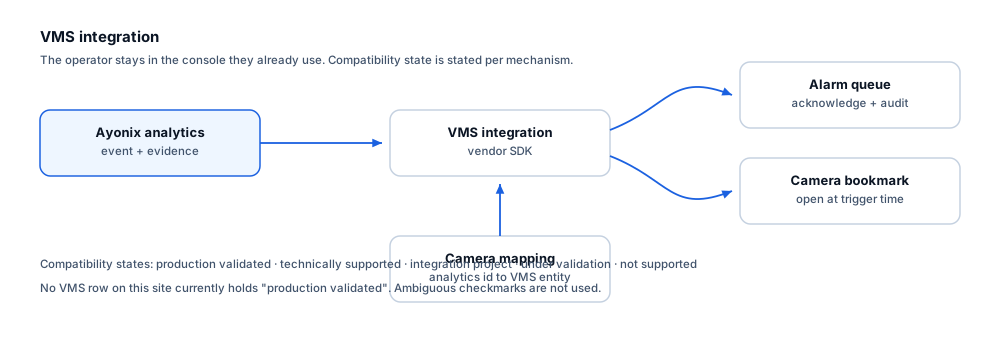
Milestone exposes integration through the MIP SDK, which third-party analytics use to raise analytic events and alarms, associate them with camera entities, and present information inside Smart Client. Ayonix lists XProtect as an integration route on its product site and asks customers to confirm availability, supported versions and licensing before design. This site therefore records the integration as an engineering project rather than a shipped, validated plugin.
Compatibility
What is supported, stated explicitly
Every mechanism carries an explicit state. No ambiguous checkmarks are used, and no certification or marketplace status is claimed without evidence.
| Mechanism | State | Notes |
|---|---|---|
| Analytic event delivery into XProtect | Available through integration project | MIP SDK supports raising analytic events that XProtect rules can act on. Scoped per project. |
| Alarm creation and operator acknowledgement | Available through integration project | Events can be surfaced as alarms in the alarm manager for acknowledgement and audit. |
| Camera and entity mapping | Available through integration project | Analytics camera identifiers are mapped to XProtect camera entities during commissioning. |
| Rule engine triggering | Available through integration project | XProtect rules can be triggered by analytic events to drive recording, PTZ presets or notification. |
| Live and recorded video navigation from an event | Available through integration project | Events carry a timestamp so the operator can open the camera at the trigger moment. |
| Smart Client presentation | Available through integration project | MIP supports plug-in presentation inside Smart Client. Scope is confirmed per project. |
| Health and status reporting | Available through integration project | Stream and analytics health can be surfaced; the mechanism is agreed during design. |
| Marketplace listing or Milestone certification | Not supported | No marketplace listing or certification is claimed. Ayonix has supplied no evidence of either, so this site does not assert it. |
What each state means
- Available through integration project
- The integration is delivered as a scoped engineering project against the vendor SDK. Plugin availability, supported versions and licensing are confirmed with Ayonix before design.
- Not supported
- Not available, and not on the current roadmap.
Operators
What this changes for the operator
- The operator stays in Smart Client rather than learning a second console.
- An analytics event appears as an alarm with the associated camera.
- Opening the alarm takes the operator to the camera at the trigger time.
- Acknowledgement is recorded in XProtect, which keeps the audit trail in one place.
- Where health reporting is in scope, a lost or blocked stream is visible alongside other system status.
Constraints
Limitations and the integration checklist
Limitations
- Available mechanisms depend on the XProtect product tier and version; not every tier exposes the same rule and alarm capability.
- Nothing on this site should be read as a certified or marketplace-listed integration.
- Smart Client presentation scope is agreed per project rather than assumed.
- Where the customer runs a heavily customised XProtect environment, integration effort increases and should be scoped explicitly.
Questions to settle before design
- Which XProtect product tier and version is in use, and does it expose the rule and alarm mechanisms needed?
- Has Ayonix confirmed plugin availability and licensing for that exact version?
- How will analytics cameras be mapped to XProtect entities, and who maintains that mapping?
- Should events appear as alarms, analytic events, or both?
- Is clock synchronisation in place across analytics nodes and VMS servers?
- What happens to events if the connection to the event server is lost?
Frequently asked questions
Is Ayonix a certified Milestone partner with a marketplace plugin?
This site makes no such claim, because no evidence of certification or a marketplace listing has been supplied. Ayonix publishes an XProtect integration route and asks customers to confirm plugin availability, supported versions and licensing. Treat the integration as a scoped engineering project until Ayonix provides evidence to the contrary.
Will our operators need a separate console?
The intent of a VMS integration is precisely to avoid that. Events are delivered into XProtect so operators work in Smart Client. Whether every element of the workflow lands in Smart Client depends on the project scope agreed during design.
Which XProtect versions are supported?
That must be confirmed with Ayonix for your specific environment. Product tier and version determine which rule, alarm and presentation mechanisms are available, so it is the first question in any integration scoping call.
Other integrations
- Author
- Gabriel Bamola, Chief Marketing Officer, Ayonix
- Technical review
- Dr Sadi Vural, Founder and Chief Executive Officer, Ayonix
- Published
- Last reviewed
Scope a Milestone XProtect integration
Integration scoping starts with confirming your product version, the mechanisms it exposes, and what your operators actually need to see. Send those details and an engineer will tell you what is achievable in your environment.