Agent activity
Checking for WebMCP support
Requests are only sent after you confirm them. How this works
security analytics
Restricted area monitoring for zones that should normally be empty
In short
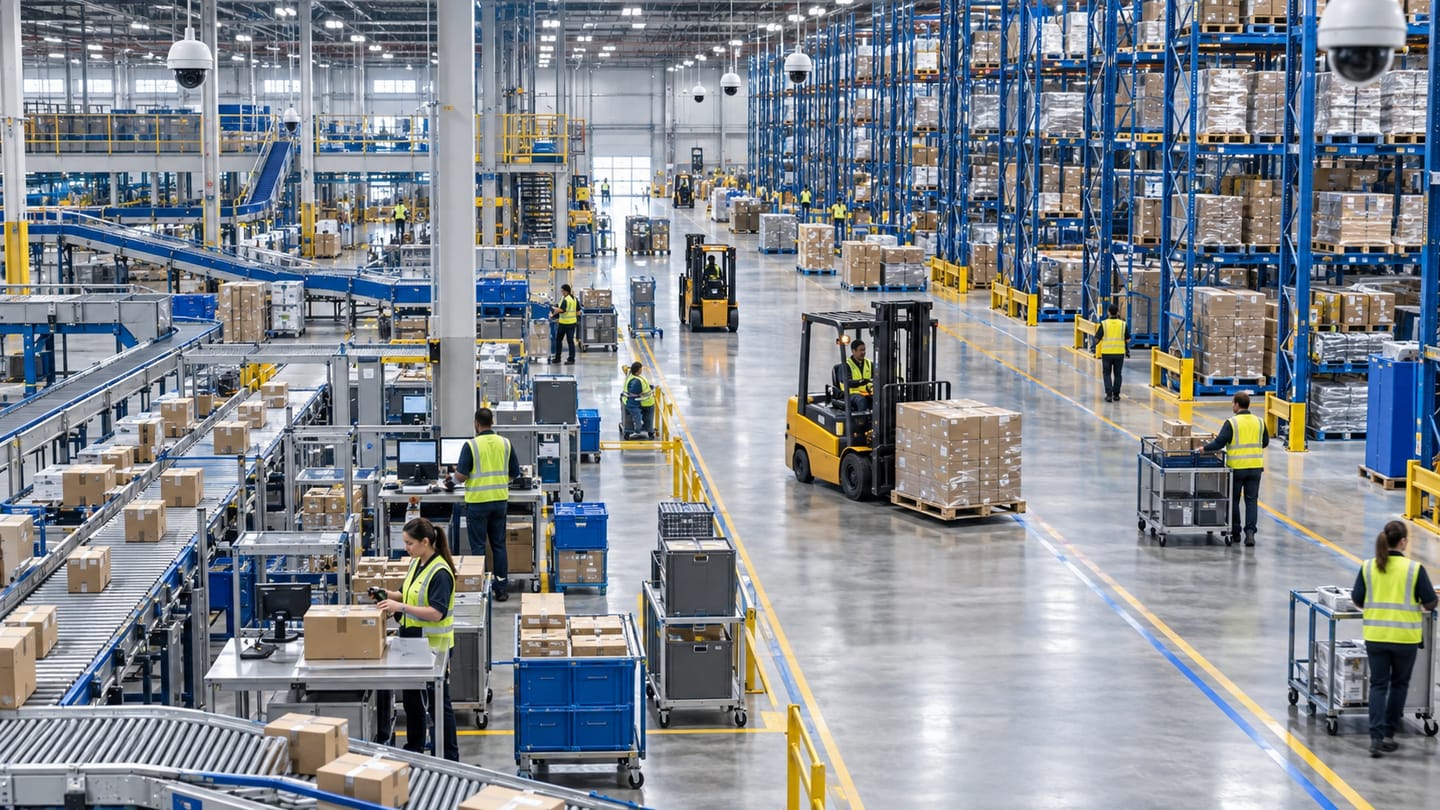
Restricted area monitoring raises an event when a person or vehicle is present inside a zone that should be empty or access-controlled at that time. Ayonix lists restricted zones as a published video analytics capability, with loading docks as a worked example. Rules are schedule-aware so routine authorised activity does not generate noise.
Scope
What this analytic does, and what it does not
What it detects
- Presence of a person inside a defined restricted zone
- Presence of a vehicle inside a defined restricted zone
- Presence outside an authorised schedule window
- Continued presence beyond a configured duration
What it does not guarantee
- That the person detected is unauthorised — the system detects presence, not permission
- Detection where the subject is fully occluded by plant, racking or a parked vehicle
- Any life-safety function inside hazardous areas
- Replacement of access control, interlocks or permit-to-work procedures
The problem
What customers are actually dealing with
These are the situations that lead teams to look at this analytic in the first place.
- A loading dock is open during shifts and should be empty overnight, but nobody is watching the camera when it is not.
- Plant rooms, substations and roof areas are entered without a permit and this is only discovered during an audit.
- Access control records show a door opening but not what happened in the space afterwards.
- Contractors work in a bonded or high-value area outside agreed windows and there is no timely record.
How it works
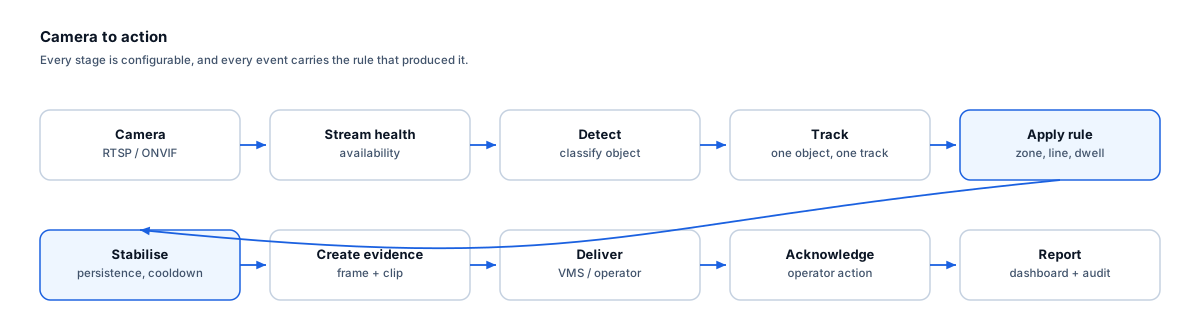
Detection workflow
Every event carries the rule that produced it, so an operator can see why they were alerted.
- 1
Ingest
The camera covering the restricted space is read and monitored for stream health.
- 2
Detect and classify
People and vehicles inside the frame are detected and classified.
- 3
Track
Objects are tracked so that presence is measured as a continuous duration.
- 4
Apply zone and schedule
The rule tests zone membership against the active schedule for that day and time.
- 5
Stabilise
A dwell threshold prevents momentary pass-throughs from raising an event, and cooldown limits repeats.
- 6
Create evidence and deliver
Frame, clip and event record are produced and routed to the VMS or operator queue.
Configuration options
- One or more polygon zones per camera, each with its own schedule
- Minimum presence duration before an event is created
- Object classes that trigger the rule
- Escalation after continued presence beyond a longer threshold
- Cooldown between repeat events for the same track
- Optional exclusion sub-zones for permanently occupied positions such as a picking station
Alert quality
How irrelevant and duplicate alerts are reduced
No video analytic eliminates false alerts. These are the mechanisms that reduce them, and the residual rate is measured on your own cameras.
- The presence threshold removes people who legitimately walk past the edge of a zone.
- Exclusion sub-zones prevent a fixed workstation inside the wider area from generating continuous events.
- Schedules remove the dominant source of noise — authorised daytime activity.
- Escalation thresholds let a short presence be logged quietly while a long presence raises an operator alert.
- Irrelevant alerts are reduced but not eliminated; the remaining rate is measured per camera during the pilot.
Prerequisites
Camera requirements and environmental limits
Camera suitability decides more of the outcome than any software setting. These are assessed per camera before commitment.
Camera requirements
- The zone boundary must be unambiguous in the camera view so the polygon matches the physical space
- Sufficient light during the hours the rule is active, including IR performance if the area is unlit
- A view that is not dominated by racking, plant or vehicles that occlude the floor area
- Object height of at least 8–10% of frame inside the zone
- Stable mounting so the polygon remains aligned with the physical area
Environmental limitations
- Large parked vehicles or moved stock can occlude a substantial part of a dock zone.
- Steam, dust and exhaust in industrial zones reduce detection contrast.
- Reflective wet floors can produce mirrored detections in some views.
- A zone drawn across a large depth range will have very different pixel-on-target at its near and far edges.
Delivery
Alerts, evidence and where they land
Event and evidence fields
- Zone name and rule
- Schedule state at trigger
- Object class and confidence
- Presence duration at trigger
- Camera and site
- Timestamp with timezone
- Still frame and clip
- Event identifier for acknowledgement
VMS integration
Zone events map to VMS alarms with the camera bookmarked at the entry time, which lets an operator scrub backwards to see how the person reached the area. Where access control is integrated separately, correlating a door event with a zone event is normally done in the VMS or PSIM rather than in the analytics layer.
See compatibility states →Deployment options
- Edge processing for remote plant rooms and substations with limited bandwidth
- On-premise processing where docks and internal zones are already on a site VMS
- Air-gapped deployment for utilities and regulated sites
- Multi-site rule templates so the same dock pattern is applied consistently across depots
Measurement
Dashboard metrics and pilot acceptance criteria
Acceptance thresholds are agreed with you before the pilot starts. This site publishes no benchmark figures, because they do not transfer between sites.
Dashboard metrics
- Out-of-schedule entries per zone per week
- Mean presence duration per entry
- Escalated events versus logged-only events
- Zones with the highest event counts
- Acknowledgement rate and time to acknowledge
- Camera availability per restricted zone
Measurable pilot criteria
- Entry recall measured with scripted entries at the start, middle and end of the rule schedule
- Irrelevant alerts per zone per day during normal operation
- Correct schedule behaviour verified across a full week including weekend variation
- Presence-duration accuracy against stopwatch ground truth
- Escalation behaviour verified for a sustained presence
Governance
Privacy and governance
- The analytic reports presence by object class, not identity.
- Where restricted zones are staff work areas, employee monitoring law and consultation duties may apply.
- Evidence access should be limited to named roles and audit-logged.
- Retention should be set to the shortest period that supports the investigation or audit purpose.
Frequently asked questions
Can it tell whether the person is authorised?
No. This analytic detects presence and classifies the object as a person or vehicle. Authorisation is an access-control question. Sites that need this correlate a zone event with an access-control transaction in the VMS or PSIM, or use the schedule to encode when presence is expected.
Our dock is busy all day — will we be flooded with alerts?
Not if the schedule reflects reality. The rule is normally inactive during operating hours and active only when the space should be empty. Where part of a zone is always occupied, an exclusion sub-zone removes that region from evaluation.
Does this work in an unlit plant room?
Only if the camera has usable IR illumination at the required range. A camera that produces a near-black frame at night cannot support a reliable rule, and the camera readiness review will flag it for a lighting or camera change.
Keep reading
Related solutions and industries
Related solutions
-
Perimeter intrusion detection
Detect people and vehicles crossing a site boundary using your existing CCTV, with rule-based zo…
-
Occupancy monitoring
Track how many people are inside a space using directional counting at entrances, with configura…
-
Dwell time alerting
Raise an event when a person or vehicle remains in a defined area longer than expected, using Ay…
-
Person detection
Classify people in a camera view as the foundation for counting, zone rules and occupancy, with …
Where it is used
-
Warehouses and logistics
Video analytics for distribution centres and logistics yards
-
Factories
Video analytics for manufacturing plants and production sites
-
Critical infrastructure
Video analytics for utilities, substations and regulated sites
-
Healthcare
Video analytics for healthcare estates and public areas
- Author
- Gabriel Bamola, Chief Marketing Officer, Ayonix
- Technical review
- Dr Sadi Vural, Founder and Chief Executive Officer, Ayonix
- Published
- Last reviewed
Evaluate restricted area monitoring on your own cameras
A controlled pilot establishes what this analytic actually does in your environment, against acceptance criteria we agree before it starts. Send a sample video first if you would rather see an assessment before committing to a pilot.