Agent activity
Checking for WebMCP support
Requests are only sent after you confirm them. How this works
Platform
From a camera stream to an event someone acted on
In short
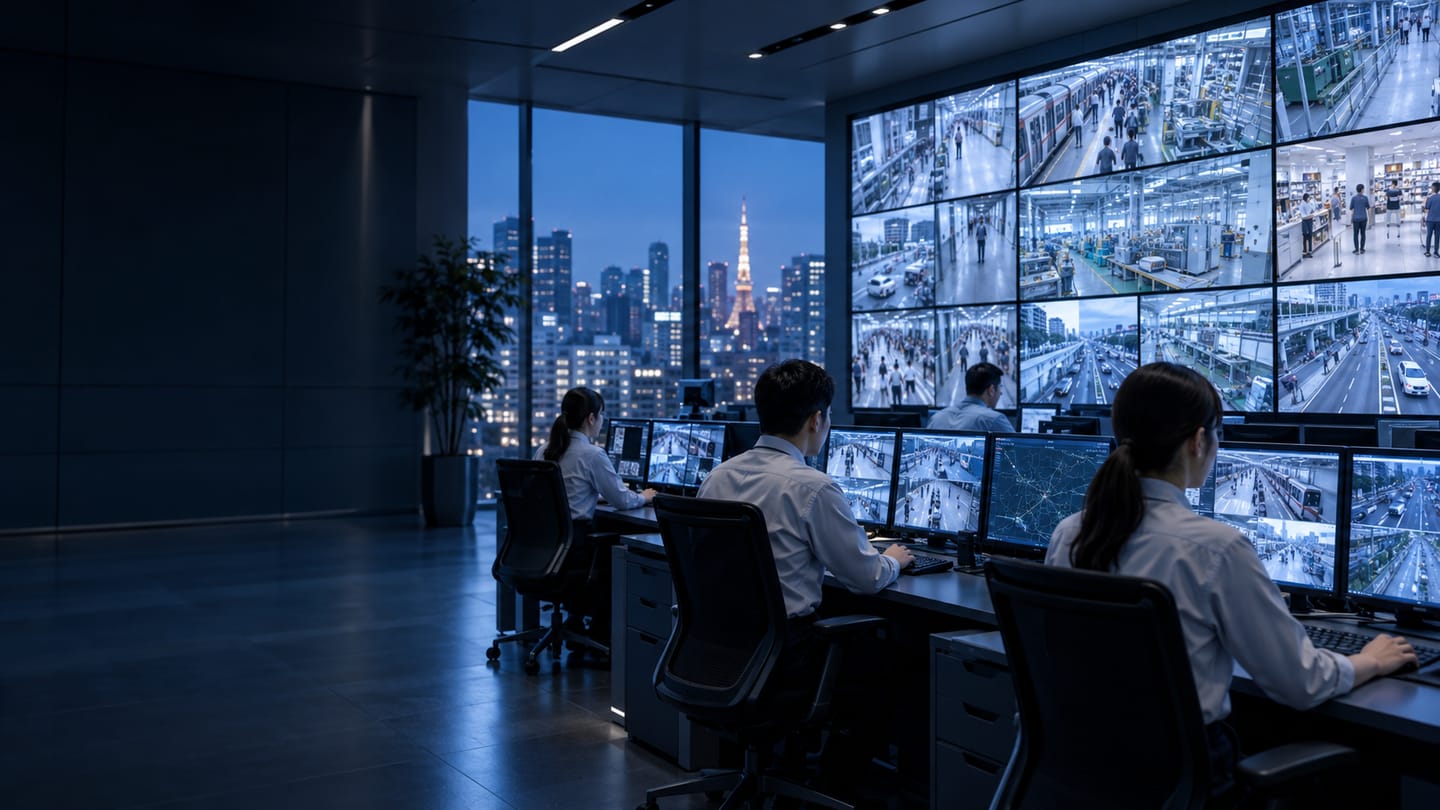
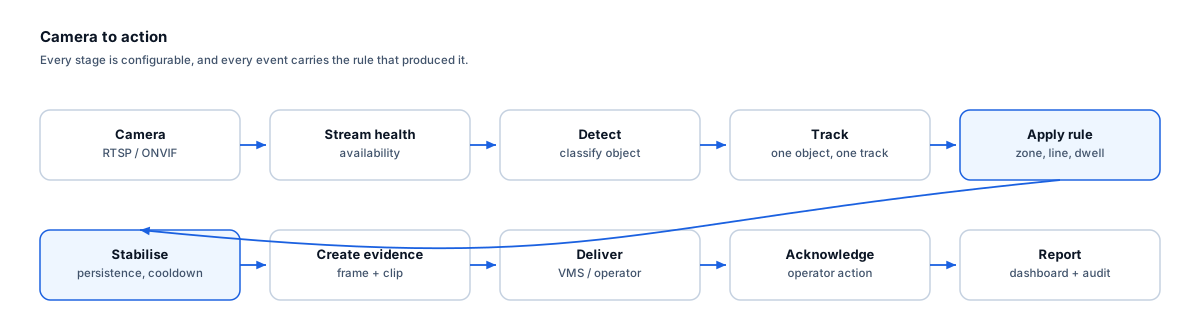
The Ayonix video analytics platform reads existing camera streams, detects and classifies objects, tracks them between frames, evaluates rules against them, stabilises the resulting events, attaches evidence, and delivers them to the VMS or operator workflow — where an acknowledgement closes the loop and creates the audit record.
Pipeline
Eleven stages, each of them configurable
- 1
Camera ingestion
Streams are read over RTSP or ONVIF from the existing camera estate, direct from cameras or via a VMS re-stream. Credentials are held server-side under the site secrets policy.
- 2
Stream health
Availability, decode errors, frame gaps and blocked views are monitored continuously. A lost or obscured stream is itself an event, because a camera that silently stops producing detections is indistinguishable from a quiet one.
- 3
Object detection
Objects in frame are detected and assigned a confidence value. Confidence thresholds are a per-camera setting established during commissioning, not a site-wide constant.
- 4
Classification
Detections are classified — person, vehicle and the classes a given analytic needs. Classification rather than raw motion is what removes weather, shadow and vegetation triggers.
- 5
Tracking
Detections are associated across frames into tracks with a stable identifier, so one object produces one event rather than one per frame. Track continuity settings control how long a track survives a brief occlusion.
- 6
Rule evaluation
The track is tested against zone geometry, line crossing and direction, dwell thresholds, object class, minimum and maximum size, and the active schedule.
- 7
Event stabilisation
Persistence windows, cooldowns and re-crossing suppression are applied before an event is created, so a momentary detection or a sustained presence does not flood the operator queue.
- 8
Evidence creation
A still frame at the trigger, a clip spanning the pre- and post-trigger window, and a structured event record carrying the rule that produced it are assembled together.
- 9
Delivery
The event is routed to the VMS as an alarm or custom event, to an operator queue, or to a webhook endpoint for an operational system.
- 10
Acknowledgement
The operator action and outcome are recorded against the event, which is what makes the alert stream auditable rather than merely noisy.
- 11
Reporting
Events and aggregate series accumulate into dashboards, and the audit record supports post-incident review and regulatory reporting.
Alert quality
How irrelevant and duplicate alerts are reduced
This is the part that decides whether operators trust the system or mute it. Every mechanism below reduces noise; none of them eliminates it.
- Object classification instead of raw motion removes the largest source of nuisance alarms: weather, shadows, vegetation and reflections.
- Minimum and maximum size filters exclude distant objects too small to classify and near-lens insects and debris.
- Track continuity means a person crossing a zone produces one event, not one per frame, and is not counted twice after walking behind a pillar.
- Persistence windows require a rule to hold for a configured period, discarding momentary detections from a bird or a shadow edge.
- Direction filters mean only the crossing you care about raises an event, which in most gate and lane scenarios removes the majority of traffic.
- Zone geometry and exclusion sub-zones keep permanently occupied positions from generating a continuous alert stream.
- Schedules remove routine authorised activity — a dock that is legitimately busy during shifts and should be empty overnight needs no alerts during the shift.
- Cooldowns prevent a single sustained presence, such as a parked vehicle inside a zone, from producing repeated alerts.
- Operator feedback on irrelevant alerts informs threshold tuning during and after the pilot.
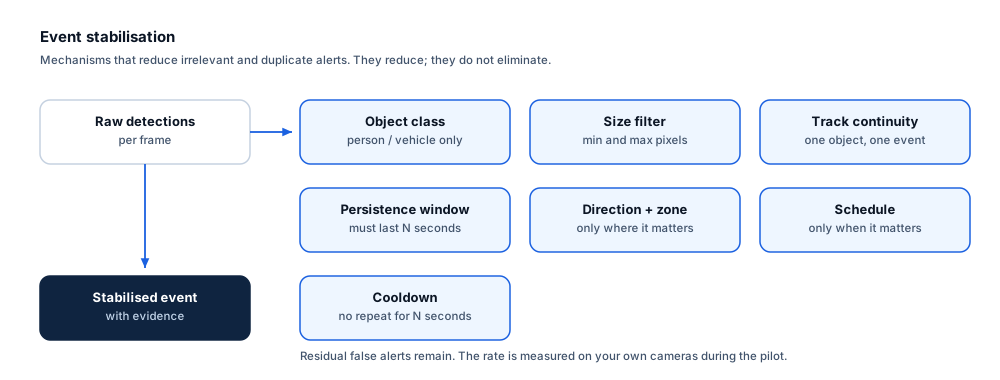
What this does not do. No combination of these mechanisms eliminates false alerts. Tuning too aggressively trades false alerts for missed events, which is usually the worse failure. The pilot measures both, and the balance is a decision you make with the numbers in front of you.
Operations
Management, audit and multi-site control
- User and role management, so evidence access is restricted by role rather than shared.
- Audit logging of events, operator actions, evidence access and configuration changes.
- System and stream health across cameras and processing nodes, including cameras below the readiness threshold.
- Multi-site management with rule templates per site group, and visibility of sites that have drifted from their template.
- Configuration backup so a replaced node can be restored to its previous state.
- API and webhook integration for operational systems that are not a VMS.
Frequently asked questions
Does event stabilisation eliminate false alerts?
No, and nothing on this site says otherwise. These mechanisms reduce irrelevant and duplicate alerts substantially compared with raw motion detection. A residual rate always remains, it depends on your cameras and conditions, and it is measured on your own site during the pilot as false alerts per camera-hour.
Why is stream health treated as an event?
Because the failure mode nobody notices is the dangerous one. A camera with a blocked view or a dead stream produces no detections, which looks exactly like a quiet camera. Surfacing availability alongside event counts is what makes the difference visible.
Where does searchable metadata fit?
Where a deployment produces object metadata and the VMS supports searching it — Network Optix, for example, provides metadata search as a platform capability — that search is available through the VMS. What is searchable depends on what the integration emits, which is agreed per project rather than assumed.
What decides whether a rule works?
Camera position, more than any software setting. Pixel-on-target at the furthest point of interest, viewing angle, delivered frame rate, lighting across the operating schedule and mounting stability decide the outcome. That is why a camera readiness review comes before any rule configuration.
- Author
- Gabriel Bamola, Chief Marketing Officer, Ayonix
- Technical review
- Dr Sadi Vural, Founder and Chief Executive Officer, Ayonix
- Published
- Last reviewed
See the pipeline run on your own cameras
A pilot starts with a camera readiness review and a log-only baseline, so the first numbers you see describe your estate rather than someone else’s. Acceptance criteria are agreed before it begins.