Agent activity
Checking for WebMCP support
Requests are only sent after you confirm them. How this works
security analytics
Person detection as the foundation layer for camera rules
In short
Person detection classifies human figures in a camera view and tracks them between frames. It is the primitive underneath Ayonix people counting, dwell analysis and zone rules: every higher-level rule depends on how reliably a person is separated from background, vehicles and clutter in your specific scene.
Scope
What this analytic does, and what it does not
What it detects
- Human figures within the camera field of view, with a confidence value per detection
- Continuous tracks as a person moves through the scene
- Approximate position on the ground plane, where the view supports it
- Object size, used to filter distant noise and near-lens artefacts
What it does not guarantee
- Identification of who the person is — this is detection, not recognition
- Detection of heavily occluded, seated or partially visible people in all views
- A fixed detection rate across different cameras, ranges and lighting
- Any inference about behaviour, intent or demographic attributes
The problem
What customers are actually dealing with
These are the situations that lead teams to look at this analytic in the first place.
- A site buys analytics, then finds that half the cameras are angled so people appear as a few dozen pixels and nothing works reliably.
- Rules are tuned on a sunny afternoon and then fail on the first wet night because confidence thresholds were never tested against poor conditions.
- Vendors quote a single accuracy number that has no relationship to the customer’s cameras.
- Nobody can explain why one camera produces clean events and the next one produces noise.
How it works
Detection workflow
Every event carries the rule that produced it, so an operator can see why they were alerted.
- 1
Ingest
Frames are decoded from the camera stream at the configured analysis rate.
- 2
Detect
A detector proposes person regions with a confidence score for each.
- 3
Filter
Size, aspect and confidence thresholds remove implausible detections.
- 4
Track
Detections are associated across frames into tracks with a stable identifier for the duration of the track.
- 5
Expose
Tracks are made available to counting, dwell, zone and occupancy rules.
Configuration options
- Confidence threshold per camera, set during commissioning against observed conditions
- Minimum and maximum bounding box size in pixels
- Analysis frame rate, balancing responsiveness against processing load
- Region-of-interest masks to exclude irrelevant parts of the frame such as a public pavement
- Track continuity settings — how long a track survives a brief occlusion
Alert quality
How irrelevant and duplicate alerts are reduced
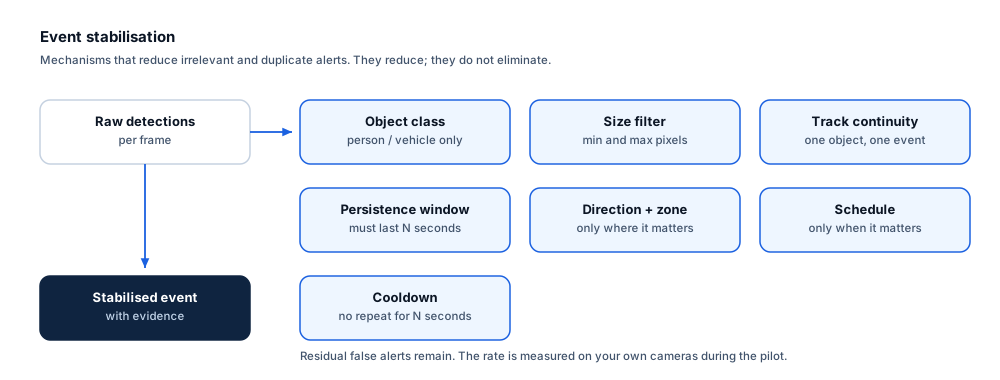
No video analytic eliminates false alerts. These are the mechanisms that reduce them, and the residual rate is measured on your own cameras.
- Tracking converts frame-level detections into a single object with a continuous identity.
- Size filters remove the two commonest noise sources: very distant objects and near-lens insects or debris.
- Region masks remove areas of the frame that should never contribute to a rule.
- Track continuity settings prevent a person who walks behind a pillar from being counted twice.
- These controls improve stability but do not produce a fixed detection rate; per-camera behaviour is measured during the readiness review.
Prerequisites
Camera requirements and environmental limits
Camera suitability decides more of the outcome than any software setting. These are assessed per camera before commitment.
Camera requirements
- Pixel-on-target is the dominant factor: aim for a person occupying at least 8–10% of frame height at the furthest point of interest
- A downward viewing angle between roughly 15° and 45° suits most people-based rules
- Consistent exposure — avoid views where a bright window or sky forces the foreground into silhouette
- Adequate IR or ambient light for the hours of operation
- Sharp focus at the working distance, verified rather than assumed
Environmental limitations
- Seated, crouching or lying people are harder to detect than standing people in most views.
- Dense crowds cause occlusion and merged tracks.
- Strong backlight, lens flare and wet reflective surfaces reduce reliability.
- Unusual clothing, carried objects and umbrellas change silhouette and can affect detection.
- Detection behaviour differs between cameras; a threshold tuned on one view does not transfer unchanged to another.
Delivery
Alerts, evidence and where they land
Event and evidence fields
- Track identifier
- Detection confidence
- Bounding box and frame position
- First and last seen timestamps
- Camera and site
- Object class
VMS integration
Person detection is not normally surfaced as a standalone VMS alarm. It is the input to zone, line and dwell rules, which are the events an operator sees. Where metadata is delivered to a VMS, it accompanies those higher-level events.
See compatibility states →Deployment options
- Edge processing close to the camera reduces backhaul and keeps video local
- On-premise servers where many streams are aggregated
- Hybrid deployment where detection runs locally and aggregated metrics are centralised
Measurement
Dashboard metrics and pilot acceptance criteria
Acceptance thresholds are agreed with you before the pilot starts. This site publishes no benchmark figures, because they do not transfer between sites.
Dashboard metrics
- Detections and tracks per camera per hour
- Mean track duration
- Confidence distribution per camera, used to set thresholds
- Cameras below the readiness threshold
- Stream availability and frame-drop rate
Measurable pilot criteria
- Detection recall against a scripted walk test at near, mid and far positions
- Behaviour in the worst realistic lighting condition for that camera
- Track continuity across a scripted occlusion
- False detection rate on an empty scene over a continuous 24-hour period
- Per-camera pass or fail against the agreed readiness threshold
Governance
Privacy and governance
- Detection produces a bounding box and a track identifier. It does not produce a biometric template and does not identify anyone.
- Track identifiers are scoped to a single camera and session and are not a persistent identifier for a person.
- Where imagery is retained for tuning, it should be handled under the same retention and access rules as the source CCTV.
Frequently asked questions
Is person detection the same as face recognition?
No. Person detection locates a human figure and tracks it within a camera view. It creates no biometric template and cannot identify anyone. Ayonix face recognition is a separate product line with its own privacy and governance requirements.
Why does the same setting behave differently on two cameras?
Because pixel-on-target, viewing angle, exposure and lens sharpness differ. Confidence thresholds are a per-camera setting established during commissioning, not a site-wide constant.
What single factor most affects results?
Pixel-on-target at the furthest point of interest. A camera that renders a person at 4% of frame height at the required range will not support reliable people-based rules regardless of how the software is configured.
Keep reading
Related solutions and industries
Related solutions
-
People counting
Count directional footfall across a virtual line using existing cameras, compare peak periods an…
-
Perimeter intrusion detection
Detect people and vehicles crossing a site boundary using your existing CCTV, with rule-based zo…
-
Occupancy monitoring
Track how many people are inside a space using directional counting at entrances, with configura…
-
Crowd density monitoring
Estimate how densely people are packed in defined areas of a concourse or platform and warn cont…
Where it is used
-
Corporate buildings
Video analytics for workplace utilisation and building security
-
Retail
Video analytics for stores that already have the cameras
-
Airports
Video analytics for airport terminals and airside boundaries
-
Education
Video analytics for education estates and campus security
- Author
- Gabriel Bamola, Chief Marketing Officer, Ayonix
- Technical review
- Dr Sadi Vural, Founder and Chief Executive Officer, Ayonix
- Published
- Last reviewed
Evaluate person detection on your own cameras
A controlled pilot establishes what this analytic actually does in your environment, against acceptance criteria we agree before it starts. Send a sample video first if you would rather see an assessment before committing to a pilot.