Agent activity
Checking for WebMCP support
Requests are only sent after you confirm them. How this works
security analytics
Dwell time alerting when something stays longer than it should
In short
Dwell time alerting raises an event when a tracked person or vehicle remains inside a defined area for longer than a configured threshold. Ayonix dwell analysis already measures how long people remain in defined areas; configured with a security threshold rather than a reporting interval, the same measurement becomes an operator notification.
Scope
What this analytic does, and what it does not
What it detects
- Continuous presence of a person in a zone beyond a threshold
- A vehicle remaining in a zone beyond a threshold
- Escalating dwell across multiple thresholds
- Repeat dwell by a track that leaves and returns within a short window
What it does not guarantee
- Any inference about why the person or vehicle is there
- Detection of dwell where the subject is occluded for long periods
- Distinction between a waiting customer, a staff member and a person of concern
- Detection of intent of any kind
The problem
What customers are actually dealing with
These are the situations that lead teams to look at this analytic in the first place.
- A vehicle sits outside a goods entrance for twenty minutes and nobody notices until it is reviewed the next day.
- ATM lobbies, stairwells and service yards attract extended presence that only becomes visible after an incident.
- General zone presence rules are too noisy because brief legitimate presence is constant.
- Operators cannot distinguish a two-minute wait from a forty-minute stay without scrubbing footage.
How it works
Detection workflow
Every event carries the rule that produced it, so an operator can see why they were alerted.
- 1
Ingest and detect
The zone camera is read and people or vehicles inside the zone are detected.
- 2
Track and accumulate
Each track accumulates continuous dwell time inside the zone polygon.
- 3
Evaluate thresholds
Accumulated dwell is tested against one or more configured thresholds.
- 4
Stabilise
Brief exits below a tolerance do not reset the accumulator; longer absences do.
- 5
Deliver
Log-only or alerting events are produced with evidence at the threshold moment.
Configuration options
- Zone polygon and the object classes evaluated
- One or more dwell thresholds, each with its own action (log, notify, escalate)
- Brief-exit tolerance before the dwell accumulator resets
- Active schedule, so thresholds differ between trading and out-of-hours periods
- Cooldown to prevent repeat alerts for the same continuing track
- Optional minimum track quality before dwell accumulation begins
Alert quality
How irrelevant and duplicate alerts are reduced
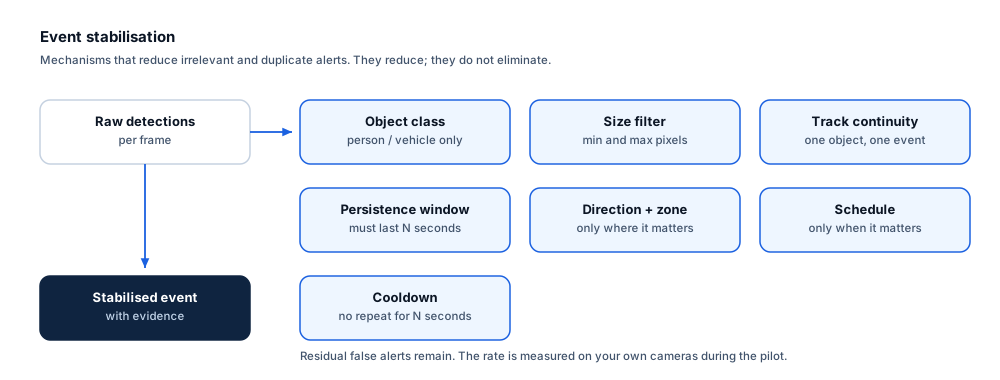
No video analytic eliminates false alerts. These are the mechanisms that reduce them, and the residual rate is measured on your own cameras.
- Brief-exit tolerance prevents a person stepping aside for a moment from resetting a long dwell.
- Graduated thresholds let short dwell be logged silently while long dwell is escalated.
- Schedule-aware thresholds mean a three-minute dwell can be normal at noon and notable at midnight.
- Cooldown stops a single continuing presence from producing repeated alerts.
- Occlusion can break a track and restart the accumulator; this behaviour is measured during the pilot.
Prerequisites
Camera requirements and environmental limits
Camera suitability decides more of the outcome than any software setting. These are assessed per camera before commitment.
Camera requirements
- A view where the subject remains visible for the whole dwell period, not just on entry
- Enough pixel-on-target to sustain a track over minutes rather than seconds
- Lighting that is stable for the whole period the rule is active
- A zone that does not include seating or positions where long presence is entirely normal, unless excluded
- Stable mounting so the zone remains aligned
Environmental limitations
- Track breaks caused by occlusion restart the dwell accumulator and can cause a long stay to be under-reported.
- Crowded zones make individual dwell measurement unreliable.
- A person who sits down may be harder to keep tracked than one who stands.
- Dwell says nothing about intent; every alert requires human assessment.
Delivery
Alerts, evidence and where they land
Event and evidence fields
- Zone and rule name
- Dwell duration at trigger and threshold crossed
- Object class and confidence
- Track identifier
- Camera and site
- Timestamp with timezone
- Still frame at threshold and clip
- Event identifier
VMS integration
Dwell alerts benefit from a bookmark at the start of the dwell rather than at the threshold moment, so an operator can see how the subject arrived. Where the VMS supports it, both timestamps are included in the event.
See compatibility states →Deployment options
- Edge processing for unmanned sites such as ATM lobbies and remote yards
- On-premise processing where several zones across a building are managed together
- Multi-site templates so the same dwell pattern applies across a branch estate
Measurement
Dashboard metrics and pilot acceptance criteria
Acceptance thresholds are agreed with you before the pilot starts. This site publishes no benchmark figures, because they do not transfer between sites.
Dashboard metrics
- Dwell events per zone per day by threshold
- Dwell duration distribution per zone
- Out-of-hours versus in-hours dwell events
- Operator-marked irrelevant alerts
- Median time to acknowledge
- Track break rate per zone
Measurable pilot criteria
- Dwell measurement accuracy against stopwatch ground truth for scripted stays
- Track break rate and its effect on reported dwell
- Irrelevant alerts per zone per day at the chosen thresholds
- Correct behaviour of the brief-exit tolerance in a scripted step-away test
- Schedule behaviour verified across a full week
Governance
Privacy and governance
- The rule measures duration of presence by object class, not identity.
- Extended-presence alerting in public-facing areas should be reviewed against local expectations and any applicable guidance.
- Evidence retention should be limited and access audit-logged.
Frequently asked questions
How is this different from loitering detection?
Dwell alerting reports a measured duration of presence against a threshold you set. It makes no judgement about behaviour or intent. Ayonix publishes dwell analysis as a capability; behaviour-classification analytics are not part of the published set and are not offered on this site.
What if someone steps out of the zone briefly?
A configurable brief-exit tolerance keeps the dwell accumulator running across short absences, so a person who steps aside for a few seconds is not treated as a new visit. Longer absences reset it.
Will this flag customers who are simply waiting?
It will if the threshold is set below normal waiting time. Thresholds must be set from observed behaviour in that specific space and time of day, which is why the pilot starts with a log-only period before any alerting is enabled.
Keep reading
Related solutions and industries
Related solutions
-
Dwell time analytics
Measure how long people remain in defined areas such as counters, displays and waiting halls, an…
-
Restricted area monitoring
Alert when a person or vehicle enters a restricted zone such as a loading dock, plant room or bo…
-
Queue management
Measure queue length and waiting time at checkouts, counters and gates, and warn supervisors bef…
-
Person detection
Classify people in a camera view as the foundation for counting, zone rules and occupancy, with …
Where it is used
-
Corporate buildings
Video analytics for workplace utilisation and building security
-
Retail
Video analytics for stores that already have the cameras
-
Critical infrastructure
Video analytics for utilities, substations and regulated sites
-
Parking
Video analytics for car parks without a sensor in every bay
- Author
- Gabriel Bamola, Chief Marketing Officer, Ayonix
- Technical review
- Dr Sadi Vural, Founder and Chief Executive Officer, Ayonix
- Published
- Last reviewed
Evaluate dwell time alerting on your own cameras
A controlled pilot establishes what this analytic actually does in your environment, against acceptance criteria we agree before it starts. Send a sample video first if you would rather see an assessment before committing to a pilot.