Agent activity
Checking for WebMCP support
Requests are only sent after you confirm them. How this works
security analytics
Perimeter intrusion detection that reaches an operator in time
In short
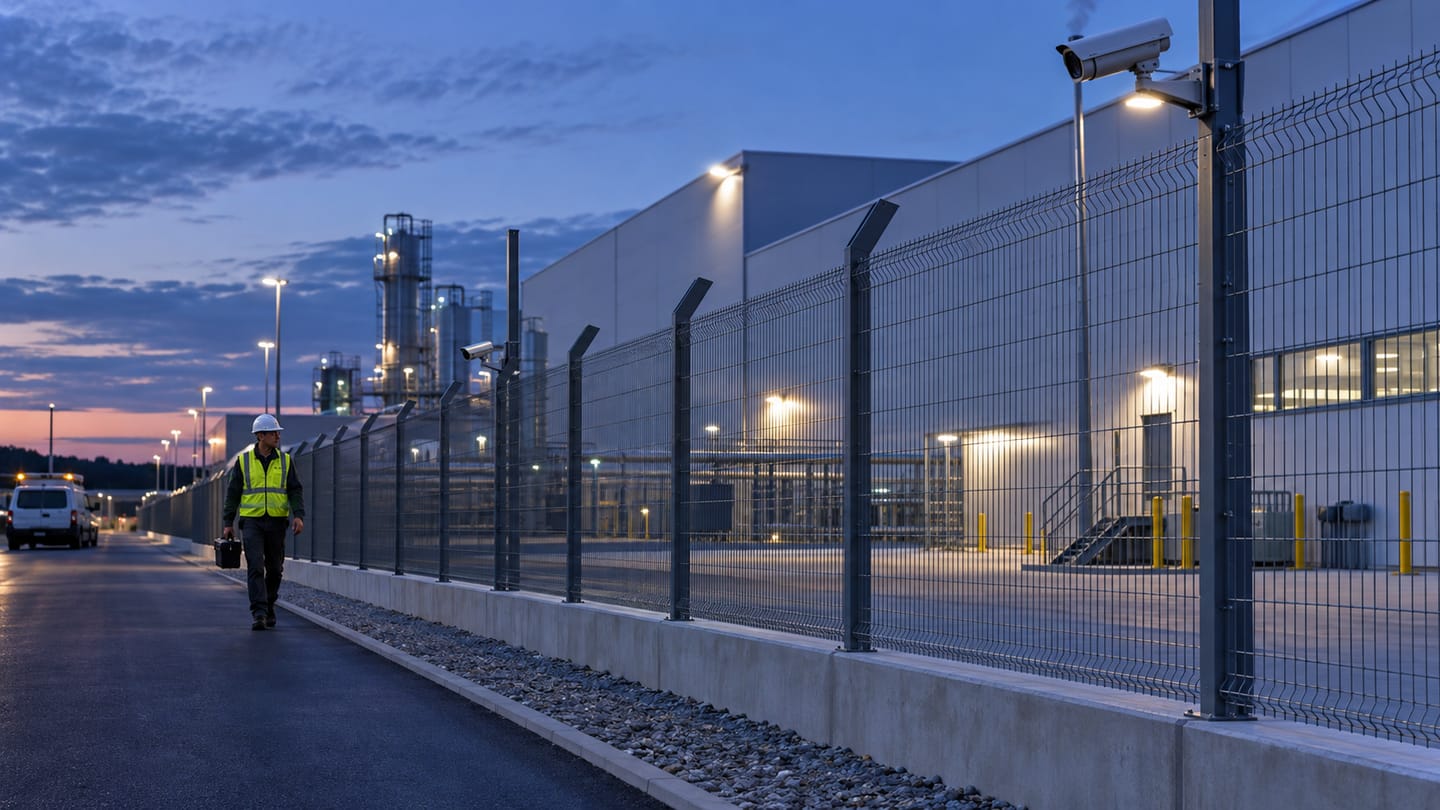
Ayonix perimeter intrusion detection identifies people and vehicles entering or crossing a defined boundary on an existing camera view. It classifies the object, applies zone, direction and schedule rules, stabilises the event, attaches evidence and delivers an alert to your VMS or operator workflow for human assessment.
Scope
What this analytic does, and what it does not
What it detects
- A person entering a defined perimeter zone
- A vehicle entering or crossing a defined perimeter zone
- Direction of travel across a boundary, where the camera view supports it
- Persistence of an object inside the zone beyond a configured window
What it does not guarantee
- Detection of every intrusion in every lighting, weather and occlusion condition
- That an alert will be acted on — an operator or automated workflow must review it
- Classification of intent, threat level or whether a person is authorised
- Replacement of physical barriers, fence sensors or certified alarm systems
The problem
What customers are actually dealing with
These are the situations that lead teams to look at this analytic in the first place.
- Fence-line cameras are recorded but nobody watches them overnight, so a breach is discovered the next morning from the recording.
- Motion-triggered alarms on the perimeter fire on rain, moving vegetation, insects near the lens and headlight sweep, so operators mute the channel.
- The perimeter runs for kilometres across several camera groups with no consistent rule set, so coverage depends on who configured which site.
- When an intrusion is real, the operator has no still frame or clip to hand to a guard patrol or the police.
How it works
Detection workflow
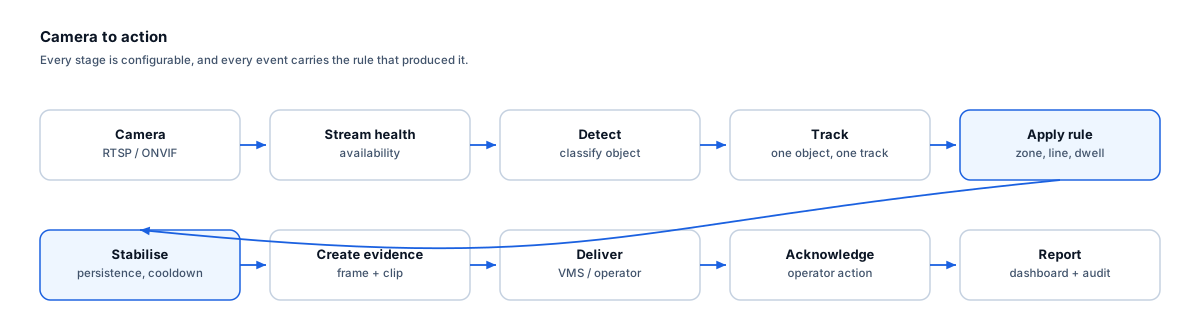
Every event carries the rule that produced it, so an operator can see why they were alerted.
- 1
Ingest
The camera stream is read over RTSP or ONVIF and stream health is monitored continuously.
- 2
Detect and classify
Objects in frame are detected and classified as person or vehicle, with a confidence value per detection.
- 3
Track
Each object is tracked between frames so that a single intruder produces one track rather than a detection per frame.
- 4
Apply rule
The track is tested against the perimeter zone, permitted direction, object class, minimum size and active schedule.
- 5
Stabilise
The event is held until the persistence window is satisfied, and a cooldown suppresses repeat alerts from the same track.
- 6
Create evidence
A still frame, a short clip around the trigger and the event record are assembled.
- 7
Deliver
The event is sent to the VMS, an operator queue or a webhook endpoint for acknowledgement.
Configuration options
- Polygon zones drawn on the camera view, with separate inner and outer boundaries where a buffer is wanted
- Object classes included in the rule (person, vehicle, or both)
- Minimum and maximum object size in pixels, to exclude distant noise and near-lens insects
- Direction filter, so that only inbound crossings raise an event
- Persistence window — how long an object must remain inside the zone before an event is raised
- Active schedule, so that the rule applies only outside staffed hours
- Per-rule cooldown to prevent repeat alerts from a single sustained presence
- Confidence threshold, tuned per camera during commissioning
Alert quality
How irrelevant and duplicate alerts are reduced
No video analytic eliminates false alerts. These are the mechanisms that reduce them, and the residual rate is measured on your own cameras.
- Track continuity means a person walking through the zone produces one event, not one per frame.
- The persistence window discards momentary detections caused by a bird, a shadow edge or compression artefacts.
- Cooldown prevents a vehicle parked inside the zone from generating a continuous alert stream.
- Direction and size filters remove a large share of weather and lighting triggers before an event is created.
- These mechanisms reduce irrelevant and duplicate alerts. They do not eliminate false alerts, and the residual rate is measured on your own cameras during the pilot.
Prerequisites
Camera requirements and environmental limits
Camera suitability decides more of the outcome than any software setting. These are assessed per camera before commitment.
Camera requirements
- The boundary must be within the camera field of view with the target object at least 8–10% of frame height for reliable classification
- Fixed mounting — a camera that vibrates in wind produces apparent motion across the whole frame
- Enough scene illumination or IR for the object to be separable from the background at the intended range
- A frame rate of at least 10 fps so that a walking person is tracked across several frames inside the zone
- A clean lens and housing; spiders, condensation and dirt on the dome are a leading cause of nuisance events
- Mounting height and angle that avoid a near-horizontal view where distant objects collapse to a few pixels
Environmental limitations
- Heavy rain, snow, fog and dense smoke reduce contrast and can suppress detection.
- Objects heavily occluded by fence fabric, vegetation or stacked stock may not be classified.
- A camera facing a low sun or vehicle headlights may lose the subject in bloom.
- Very distant boundaries with small pixel-on-target will not classify reliably regardless of rule tuning.
- Animals of a similar size to a crouching person can produce classification errors in some scenes.
Delivery
Alerts, evidence and where they land
Event and evidence fields
- Event type and rule name
- Camera identifier and site
- Timestamp with timezone
- Object class and detection confidence
- Zone name and entry point
- Direction of travel where available
- Still frame at trigger
- Clip covering the pre- and post-trigger window
- Event identifier for acknowledgement and audit
VMS integration
Perimeter events can be surfaced as VMS alarms or custom events so that the operator stays in the console they already use, with the camera bookmarked at the trigger time for immediate playback. Confirm plugin availability, supported VMS versions and licensing for your environment with Ayonix before design.
See compatibility states →Deployment options
- Edge processing at the site keeps perimeter video local and continues to alert during a WAN outage
- On-premise server processing suits sites where cameras are already aggregated into a local VMS
- Air-gapped deployment for defence, utilities and other environments with no outbound connectivity
- Multi-site management to copy a validated perimeter rule set across comparable depots
Measurement
Dashboard metrics and pilot acceptance criteria
Acceptance thresholds are agreed with you before the pilot starts. This site publishes no benchmark figures, because they do not transfer between sites.
Dashboard metrics
- Events per camera per night, trended over the pilot
- Acknowledged versus unhandled events
- Median time from event creation to operator acknowledgement
- Events by zone and by hour of night
- Camera stream availability and blocked-view detections
- Operator-marked irrelevant alerts per camera-hour
Measurable pilot criteria
- Event recall measured against a scripted walk test at defined entry points, times and weather conditions
- Irrelevant alerts per camera-hour, counted by the operator over a continuous seven-night window
- Median alert latency from boundary crossing to appearance in the operator queue
- Duplicate alerts per genuine intrusion
- Stream availability across the pilot period
- Acceptance thresholds are agreed with you before the pilot starts and reflect your site, not a published benchmark.
Governance
Privacy and governance
- Perimeter rules operate on object class, not identity. No face matching is performed by this analytic.
- Retention of event clips should be set to the shortest period that supports investigation and is documented in the site privacy notice.
- Signage requirements for camera surveillance vary by jurisdiction and are the site operator’s responsibility.
- Access to event evidence should be role-restricted and audit-logged.
Frequently asked questions
Will this remove all false alarms from our perimeter cameras?
No. Classification, zone rules, persistence windows and cooldowns reduce irrelevant and duplicate alerts substantially compared with raw motion detection, but no video analytic eliminates false alerts. The residual rate depends on your cameras, lighting and weather, and is measured on your own site during the pilot.
Can we use our existing perimeter cameras?
In most cases yes, provided the boundary is in view with enough pixels on target and the camera is stable and reasonably clean. Camera suitability is assessed per camera during the readiness review, and some views will need re-aiming or a lens change before they can support a reliable rule.
Does it replace our fence sensors or alarm system?
No. It is a video-based detection and operator-notification layer. Physical barriers, fence-mounted sensors and certified alarm systems serve a different function and should remain in place.
How long does it take to tune a perimeter camera?
Initial rule configuration is quick, but useful tuning needs observation across day, night and at least one poor-weather period. A one to two week observation window before setting final thresholds is typical.
Keep reading
Related solutions and industries
Related solutions
-
Line crossing detection
Raise an event when a person or vehicle crosses a virtual line in a defined direction, using the…
-
Restricted area monitoring
Alert when a person or vehicle enters a restricted zone such as a loading dock, plant room or bo…
-
Person detection
Classify people in a camera view as the foundation for counting, zone rules and occupancy, with …
-
Dwell time alerting
Raise an event when a person or vehicle remains in a defined area longer than expected, using Ay…
Where it is used
-
Critical infrastructure
Video analytics for utilities, substations and regulated sites
-
Warehouses and logistics
Video analytics for distribution centres and logistics yards
-
Factories
Video analytics for manufacturing plants and production sites
-
Construction
Video analytics for construction sites that change every week
- Author
- Gabriel Bamola, Chief Marketing Officer, Ayonix
- Technical review
- Dr Sadi Vural, Founder and Chief Executive Officer, Ayonix
- Published
- Last reviewed
Evaluate perimeter intrusion detection on your own cameras
A controlled pilot establishes what this analytic actually does in your environment, against acceptance criteria we agree before it starts. Send a sample video first if you would rather see an assessment before committing to a pilot.