Agent activity
Checking for WebMCP support
Requests are only sent after you confirm them. How this works
security analytics
Line crossing detection with direction and schedule control
In short
Line crossing detection raises an event when a tracked object crosses a virtual line drawn on the camera view in a configured direction. Ayonix people counting already counts movement across a virtual line; the same mechanism, configured to alert rather than tally, provides directional crossing events for security and access workflows.
Scope
What this analytic does, and what it does not
What it detects
- A person crossing a virtual line in a specified direction
- A vehicle crossing a virtual line in a specified direction
- Crossings during a defined schedule only
- Sequential crossings of paired lines, where a tripwire pattern is configured
What it does not guarantee
- Detection of a crossing where the object is occluded at the moment it passes the line
- Identification of who crossed, or whether they were authorised
- Accurate direction where the camera view is close to head-on and depth cues are weak
- Substitution for a physical access control decision
The problem
What customers are actually dealing with
These are the situations that lead teams to look at this analytic in the first place.
- A one-way corridor, gate lane or fire escape is used in the wrong direction and nobody is told until a manual review.
- A zone rule is too broad — the team only cares about the moment of crossing a specific threshold, not general presence in an area.
- Existing counting lines produce useful totals but cannot notify anyone at the moment an out-of-hours crossing happens.
- Tailgating past a gate is visible in recordings but never surfaces as an event.
How it works
Detection workflow
Every event carries the rule that produced it, so an operator can see why they were alerted.
- 1
Ingest
The stream is read and the virtual line geometry is applied to the camera view.
- 2
Detect and track
Objects are classified and tracked so that a crossing is attributed to a continuous track.
- 3
Evaluate crossing
The track path is tested against the line and the configured crossing direction.
- 4
Filter
Object class, minimum size and active schedule are applied before an event is created.
- 5
Stabilise
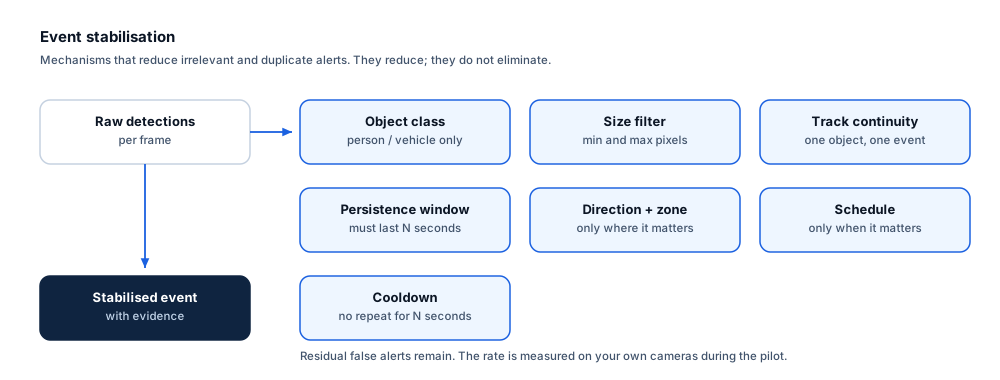
A short re-crossing suppression window prevents a person loitering on the line from generating repeated events.
- 6
Deliver
The event and its evidence are sent to the VMS, operator queue or webhook.
Configuration options
- Line geometry and position on the camera view, including multi-segment lines
- Permitted and alerting directions (A→B, B→A, or both)
- Object classes that may trigger the rule
- Active schedule windows per day of week
- Re-crossing suppression window in seconds
- Whether the same line simultaneously feeds a counting total and an alert rule
Alert quality
How irrelevant and duplicate alerts are reduced
No video analytic eliminates false alerts. These are the mechanisms that reduce them, and the residual rate is measured on your own cameras.
- Direction filtering removes the largest source of unwanted crossing events — normal traffic in the permitted direction.
- Re-crossing suppression stops a person standing on the line from producing a burst of events.
- Track-based evaluation means a crossing is registered once, from a continuous path, rather than from frame-level detections.
- A minimum track length before the crossing avoids counting objects that first appear on top of the line.
- Residual false crossings still occur in crowded or occluded views and are quantified during the pilot.
Prerequisites
Camera requirements and environmental limits
Camera suitability decides more of the outcome than any software setting. These are assessed per camera before commitment.
Camera requirements
- A viewing angle with visible separation between objects at the line — a steep or overhead angle is strongly preferred in busy scenes
- Object height of roughly 10% of frame or more at the line position
- A frame rate of 12–15 fps or higher so that fast movement is not missed between frames
- Stable mounting so the line stays aligned with the physical threshold
- Consistent illumination at the line position across the operating schedule
Environmental limitations
- In dense crowds, individual tracks merge and crossings can be missed or merged.
- Head-on camera angles make direction determination less reliable than oblique or overhead views.
- Objects that appear or disappear exactly at the line (for example, emerging from behind a pillar) may not produce a valid crossing.
- Very fast vehicles can cross between frames at low frame rates.
Delivery
Alerts, evidence and where they land
Event and evidence fields
- Rule and line name
- Crossing direction
- Object class and confidence
- Camera and site
- Timestamp with timezone
- Still frame at crossing
- Short clip spanning the crossing
- Event identifier
VMS integration
A crossing event maps cleanly to a VMS custom event or alarm, with the camera bookmarked at the crossing time. Where the same line also produces counts, the counting series is normally delivered to the operational dashboard rather than the VMS. Confirm supported versions and licensing with Ayonix.
See compatibility states →Deployment options
- Edge processing where the crossing must alert during a network outage
- On-premise processing where several lines across a building are managed centrally
- Hybrid deployment where alerting is local and counting totals are aggregated centrally
Measurement
Dashboard metrics and pilot acceptance criteria
Acceptance thresholds are agreed with you before the pilot starts. This site publishes no benchmark figures, because they do not transfer between sites.
Dashboard metrics
- Crossings per direction per hour
- Out-of-schedule crossings per day
- Alert acknowledgement rate
- Median latency from crossing to alert
- Suppressed re-crossings
- Camera availability at the line position
Measurable pilot criteria
- Crossing recall measured against a scripted walk and drive test in both directions
- Direction accuracy measured separately from crossing recall
- False crossings per camera-hour during normal operation
- Latency from physical crossing to operator-visible alert
- Behaviour under a scripted crowd condition, where relevant to the site
Governance
Privacy and governance
- The rule evaluates object class and path, not identity.
- Where a crossing line covers a staff entrance, employee monitoring rules and consultation obligations may apply in your jurisdiction.
- Counting output is aggregate and does not require retention of identifiable imagery.
Frequently asked questions
How is this different from perimeter intrusion detection?
A perimeter rule watches an area and reacts to presence inside it. A line rule reacts to the moment of crossing a specific threshold in a specific direction. Sites frequently use both — an area rule for the fence buffer, a line rule for the gate lane.
Can one line both count and alert?
Yes. The same directional crossing mechanism can feed a counting series for operational reporting and an alerting rule with its own schedule. This is a common configuration where a gate needs both throughput data and out-of-hours notification.
Is it reliable in a crowd?
Reliability falls as tracks merge. In busy scenes an overhead or steeply angled view is strongly preferred, and expected performance should be established on your own camera during the pilot rather than assumed.
Keep reading
Related solutions and industries
Related solutions
-
Perimeter intrusion detection
Detect people and vehicles crossing a site boundary using your existing CCTV, with rule-based zo…
-
People counting
Count directional footfall across a virtual line using existing cameras, compare peak periods an…
-
Entrance and exit analytics
Report directional entry and exit volumes per doorway, compare peak periods and identify which e…
-
Restricted area monitoring
Alert when a person or vehicle enters a restricted zone such as a loading dock, plant room or bo…
Where it is used
-
Warehouses and logistics
Video analytics for distribution centres and logistics yards
-
Corporate buildings
Video analytics for workplace utilisation and building security
-
Railway and metro
Video analytics for stations, platforms and concourses
-
Factories
Video analytics for manufacturing plants and production sites
- Author
- Gabriel Bamola, Chief Marketing Officer, Ayonix
- Technical review
- Dr Sadi Vural, Founder and Chief Executive Officer, Ayonix
- Published
- Last reviewed
Evaluate line crossing detection on your own cameras
A controlled pilot establishes what this analytic actually does in your environment, against acceptance criteria we agree before it starts. Send a sample video first if you would rather see an assessment before committing to a pilot.