Agent activity
Checking for WebMCP support
Requests are only sent after you confirm them. How this works
traffic analytics
Vehicle detection across parking areas and monitored locations
In short
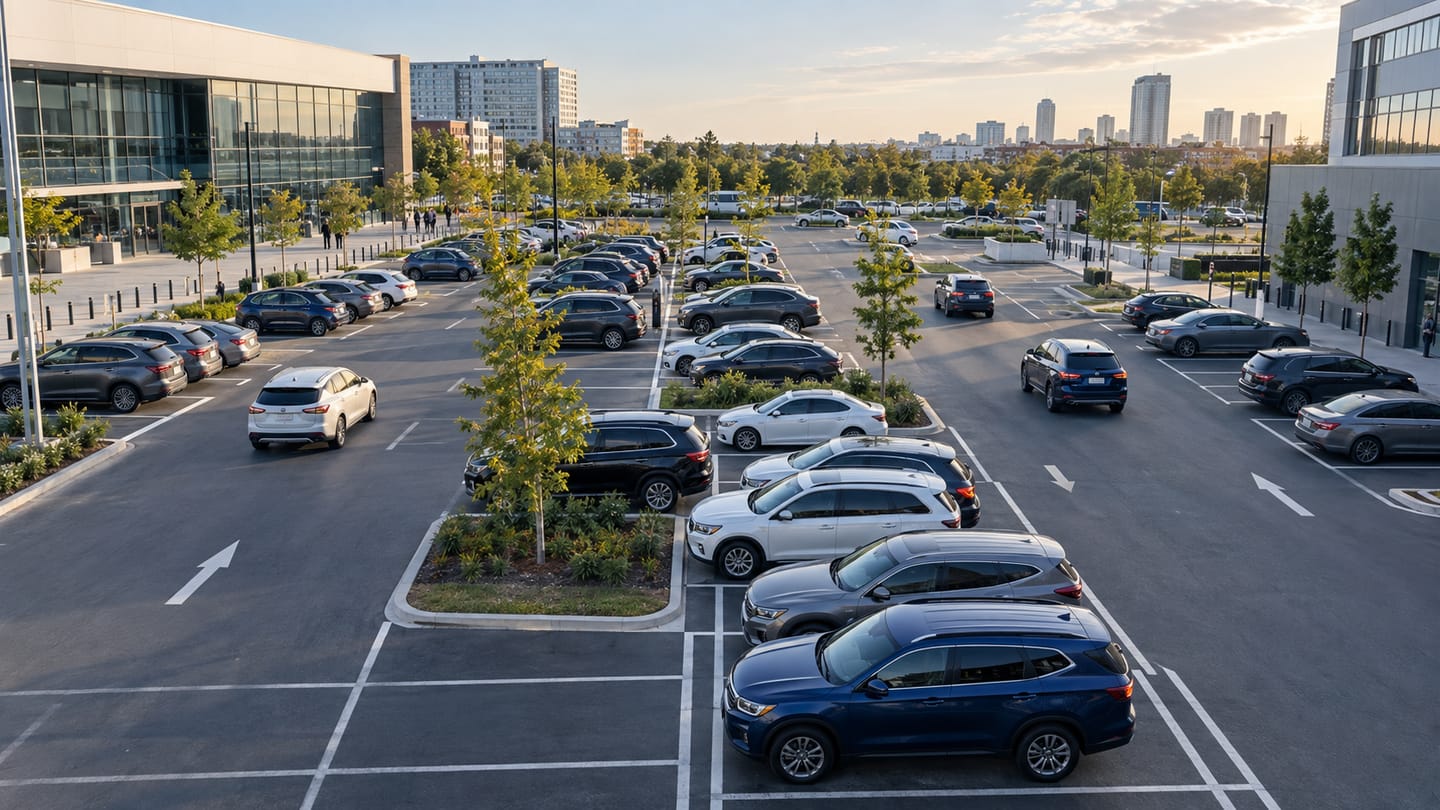
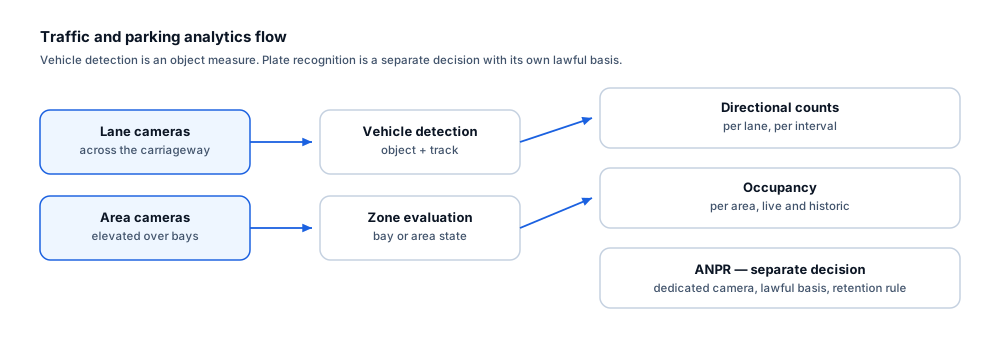
Ayonix vehicle detection identifies vehicles in parking areas and monitored locations from an existing camera view, and tracks them between frames. It is the primitive beneath vehicle counting, parking occupancy and vehicle zone rules, and reports position and class without reading plates.
Scope
What this analytic does, and what it does not
What it detects
- Vehicles present in the camera field of view
- Continuous vehicle tracks as they move through the scene
- Vehicle presence within a defined zone or bay
- Stationary versus moving state, where the view supports it
What it does not guarantee
- Identification of a specific vehicle or its registered keeper
- Reading of a licence plate — that is a separate ANPR capability with different camera requirements
- Detection of heavily occluded vehicles in a densely packed yard
- Reliable make, model or colour attribution
The problem
What customers are actually dealing with
These are the situations that lead teams to look at this analytic in the first place.
- A yard has cameras but no data on how many vehicles are present or how long they stay.
- Barrier and loop counts cover the entrance but not what happens inside the site.
- Parking areas are managed by patrol because there is no live view of which areas are full.
- Motion-based rules on vehicle areas fire on every passing headlight and shadow.
How it works
Detection workflow
Every event carries the rule that produced it, so an operator can see why they were alerted.
- 1
Ingest
Camera streams covering vehicle areas are read and monitored for availability.
- 2
Detect
Vehicles in frame are detected with a confidence value per detection.
- 3
Filter
Size and confidence thresholds and region masks remove implausible detections and irrelevant areas.
- 4
Track
Detections are associated into tracks so that one vehicle produces one continuous object.
- 5
Expose
Tracks and zone membership are made available to counting, occupancy and zone rules.
Configuration options
- Confidence threshold per camera, set during commissioning
- Minimum and maximum vehicle size in pixels for the covered range
- Region masks to exclude a public road or neighbouring site in view
- Bay or zone polygons where per-space occupancy is required
- Track continuity settings across brief occlusion by other vehicles
- Stationary threshold before a vehicle is treated as parked
Alert quality
How irrelevant and duplicate alerts are reduced
No video analytic eliminates false alerts. These are the mechanisms that reduce them, and the residual rate is measured on your own cameras.
- Tracking means a vehicle driving through the scene produces one object rather than a detection per frame.
- Region masks remove public roads and adjacent property, which are the commonest source of irrelevant detections.
- A stationary threshold prevents a vehicle slowing at a junction from being recorded as parked.
- Size filtering separates vehicles from large objects and from distant traffic outside the area of interest.
- Per-camera behaviour varies with angle and range and is characterised during the readiness review.
Prerequisites
Camera requirements and environmental limits
Camera suitability decides more of the outcome than any software setting. These are assessed per camera before commitment.
Camera requirements
- A view where the vehicle occupies a meaningful part of the frame at the furthest bay or lane of interest
- An elevated angle that limits one vehicle occluding another, which matters most in packed yards
- Adequate illumination for the hours of operation, including IR where the area is unlit
- Stable mounting so bay polygons stay aligned with the physical markings
- Exposure settings that cope with headlights at night without blooming across the frame
Environmental limitations
- In densely packed areas, vehicles occlude each other and detection of the rear rows degrades.
- Strong headlight glare at night can wash out detail across part of the frame.
- Heavy rain, snow cover and standing water change vehicle appearance and reduce reliability.
- Very oblique views compress distant bays to the point where per-bay resolution is not achievable.
Delivery
Alerts, evidence and where they land
Event and evidence fields
- Track identifier and object class
- Detection confidence
- Zone or bay membership
- Stationary state and duration
- Camera and site
- First and last seen timestamps
VMS integration
Vehicle detection is the input to zone and counting rules rather than a standalone alarm. Vehicle zone events, such as presence in a restricted yard area outside hours, are delivered to the VMS in the same way as person-based zone events.
See compatibility states →Deployment options
- Edge processing at the yard or car park, keeping video local
- On-premise processing where site cameras already aggregate to a local server
- Multi-site deployment for consistent yard measurement across depots
Measurement
Dashboard metrics and pilot acceptance criteria
Acceptance thresholds are agreed with you before the pilot starts. This site publishes no benchmark figures, because they do not transfer between sites.
Dashboard metrics
- Vehicle detections and tracks per camera per hour
- Occupied bays or zones over time
- Mean stationary duration per zone
- Confidence distribution per camera
- Cameras below the readiness threshold for vehicle rules
- Stream availability
Measurable pilot criteria
- Detection recall across near, mid and far bays under day and night conditions
- Behaviour with a full yard, where occlusion is at its worst
- False detections per camera per day on an empty area
- Stationary-state accuracy against observed arrival and departure times
- Per-camera pass or fail against the agreed readiness threshold
Governance
Privacy and governance
- Detection identifies a vehicle as an object. It does not read plates and does not identify a keeper or driver.
- Where a camera view includes a public road, region masking should be used to limit processing to the site.
- Vehicle tracks are scoped to a camera session and are not a persistent vehicle identifier.
Frequently asked questions
Does vehicle detection read number plates?
No. It detects and tracks vehicles as objects. Plate reading is ANPR, which has substantially stricter camera, angle, shutter and lighting requirements and its own privacy considerations. Many sites find vehicle presence answers the operational question without plates.
Will it work in a full car park?
The front rows will detect well; rear rows in a very oblique view may not, because vehicles occlude each other. Camera height and angle are the determining factors, and the readiness review reports per-camera coverage rather than assuming the whole area works.
Can it tell a van from a car?
Broad class separation is possible in views with adequate resolution, but reliable make, model and detailed classification are not claimed here. Where class granularity matters commercially, it is characterised specifically during the pilot.
Keep reading
Related solutions and industries
Related solutions
-
Vehicle counting
Count vehicles crossing a line by direction to measure throughput at entrances, lanes and access…
-
Parking occupancy analytics
Report live and historic occupancy for car parks, yards and bays using vehicle detection over ba…
-
ANPR / licence plate recognition
What ANPR requires to work — camera angle, shutter speed, lighting, plate format and retention —…
-
Restricted area monitoring
Alert when a person or vehicle enters a restricted zone such as a loading dock, plant room or bo…
Where it is used
-
Parking
Video analytics for car parks without a sensor in every bay
-
Warehouses and logistics
Video analytics for distribution centres and logistics yards
-
Smart cities
Video analytics for city mobility and public-space management
-
Critical infrastructure
Video analytics for utilities, substations and regulated sites
- Author
- Gabriel Bamola, Chief Marketing Officer, Ayonix
- Technical review
- Dr Sadi Vural, Founder and Chief Executive Officer, Ayonix
- Published
- Last reviewed
Evaluate vehicle detection on your own cameras
A controlled pilot establishes what this analytic actually does in your environment, against acceptance criteria we agree before it starts. Send a sample video first if you would rather see an assessment before committing to a pilot.